
Chart of Accounts and Groups
The chart of accounts is the backbone of accounting: the seven-class Uniform Chart of Accounts comes ready, and you only add sub-accounts. The type and group of each account decide how automatic entries and reports work.
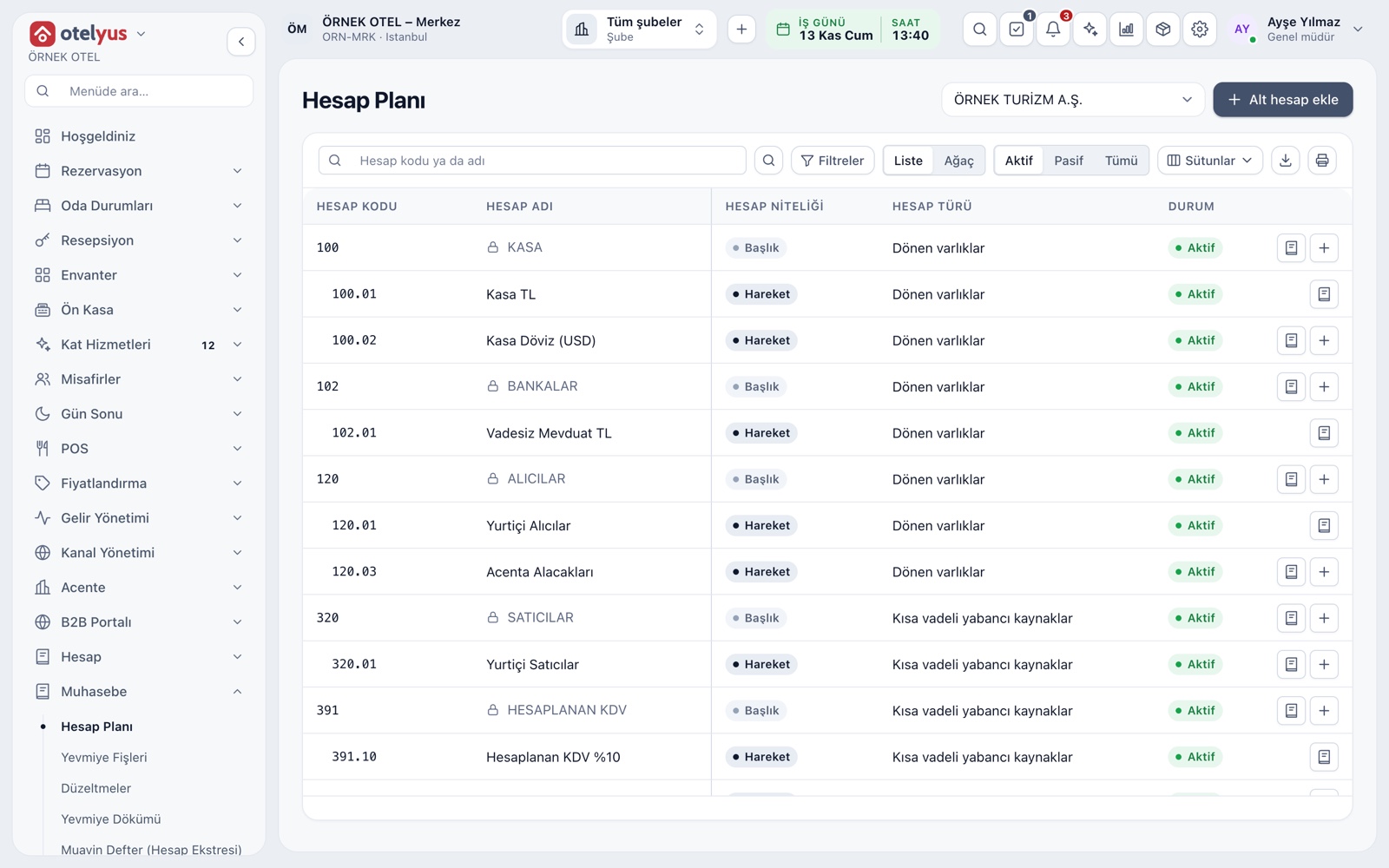
A Chart That Comes Ready
The moment you open the books, the Uniform Chart of Accounts and the hotel template's sub-accounts are loaded, so you do not build the chart from scratch. Each legal entity keeps its own chart. On the page you search by code and name in list view, or drill from class to sub-account in tree view.
- The chart opens together with the first fiscal year's 12 periods.
- Each account shows its origin: uniform chart, template or user.
- One click on an account opens its statement.
- Choose expense profile 7/A or 7/B with your accountant.
Seven Classes, Main Accounts and Sub-Accounts
Accounts fall into seven classes: current and fixed assets, short and long-term liabilities, equity, income statement and cost accounts. Three-digit main accounts form the groups, and dotted codes make up your sub-accounts. The balance sheet and income statement are built from these groups.
- Classes 1–5 form the balance sheet, 6 the income statement, 7 costs.
- A header account only shows totals; entries go to posting accounts.
- Trial balance and ledger can be rolled up to main-account level.
Account Types and Opening Sub-Accounts
Each account has a type, a normal balance and feature flags; the cash, bank, receivable and payable flags make sure the right account is picked when posting. A sub-account is opened by adding a sequence number after the parent code, and the system suggests the next free code.
- A code looks like 120.05: parent account, dot and sequence.
- A foreign-currency account takes lines only in its own currency.
- The currency of an account with activity cannot change.
- Every sub-account opened is written to the audit trail.
Accounts Behind Automatic Entries
The accounts used by automatic entries are system accounts and cannot be made inactive. Which event posts to which account is held in the account mapping table: accommodation income, department income, VAT, collections, exchange differences and rounding. A mapping has an effective date, so past entries are not affected by a new mapping.
- The name of a main account cannot be changed; only sub-accounts are edited.
- An event with a missing mapping waits, showing what is missing.
- Without a custom mapping, the default account is used.
Dimensions: Department, Cost Centre, Branch
Income and expense entries are tagged with dimensions as well as the account: department, cost centre, product line, POS branch and venue. If you wish, you can make the department mandatory on income and expense lines. Dimensions work as report filters and do not require extra accounts in the chart.
- Dimensions are defined per taxpayer and can be active or inactive.
- When required, income and expense lines cannot leave the department empty.
- Opening, closing and reversing entries are exempt.
Taxpayer Profile and Sales-to-Books Link
Each taxpayer's profile holds the ledger type, tax office, MERSİS number, e-invoice, e-archive and e-ledger start dates and the fiscal year start month. This is also where you link restaurant and venue sales to the taxpayer whose books they are written to; without a link, a sale is written to the property's own taxpayer.
- The fiscal year starts in January by default.
- A sales-to-books link cannot apply retroactively.
- A single-taxpayer business needs no separate link.
Modules used together
Accounting
Uniform chart of accounts, trial balance and VAT
Learn moreJournal Entries and Corrections
Journal entry, corrections and voucher review
Learn moreTrial Balance and Financial Reports
Trial balance, balance sheet and income statement
Learn moreAccount (Ledger) Management
Customer, supplier and agency accounts, opening entries
Learn moreFiscal Years and Periods
Open, close and lock periods
Learn moreFrequently Asked Questions
Can I change the Uniform Chart of Accounts?
The main accounts and their names are fixed. You can add and edit sub-accounts specific to your business.
Do I have to set up the chart from scratch?
No. When you open the books, the Uniform Chart of Accounts and the hotel template's sub-accounts are loaded; with your accountant you only define the sub-accounts specific to your business.
What if I cannot find the account I need while posting?
You can open a new sub-account from the same screen; the system suggests the next free code.
Is the chart shared if I have several companies?
No. Each legal entity has its own chart and books.
Meet Chart of Accounts and Groups
Let us call you for a live walkthrough, or try it free for 1 month.