
Waste and Spoilage
A broken bottle, milk past its date, a plate on the floor: every loss is recorded with a reason and a responsible person, deducted from stock and reported at cost. Normal spoilage and write-offs are tracked separately.
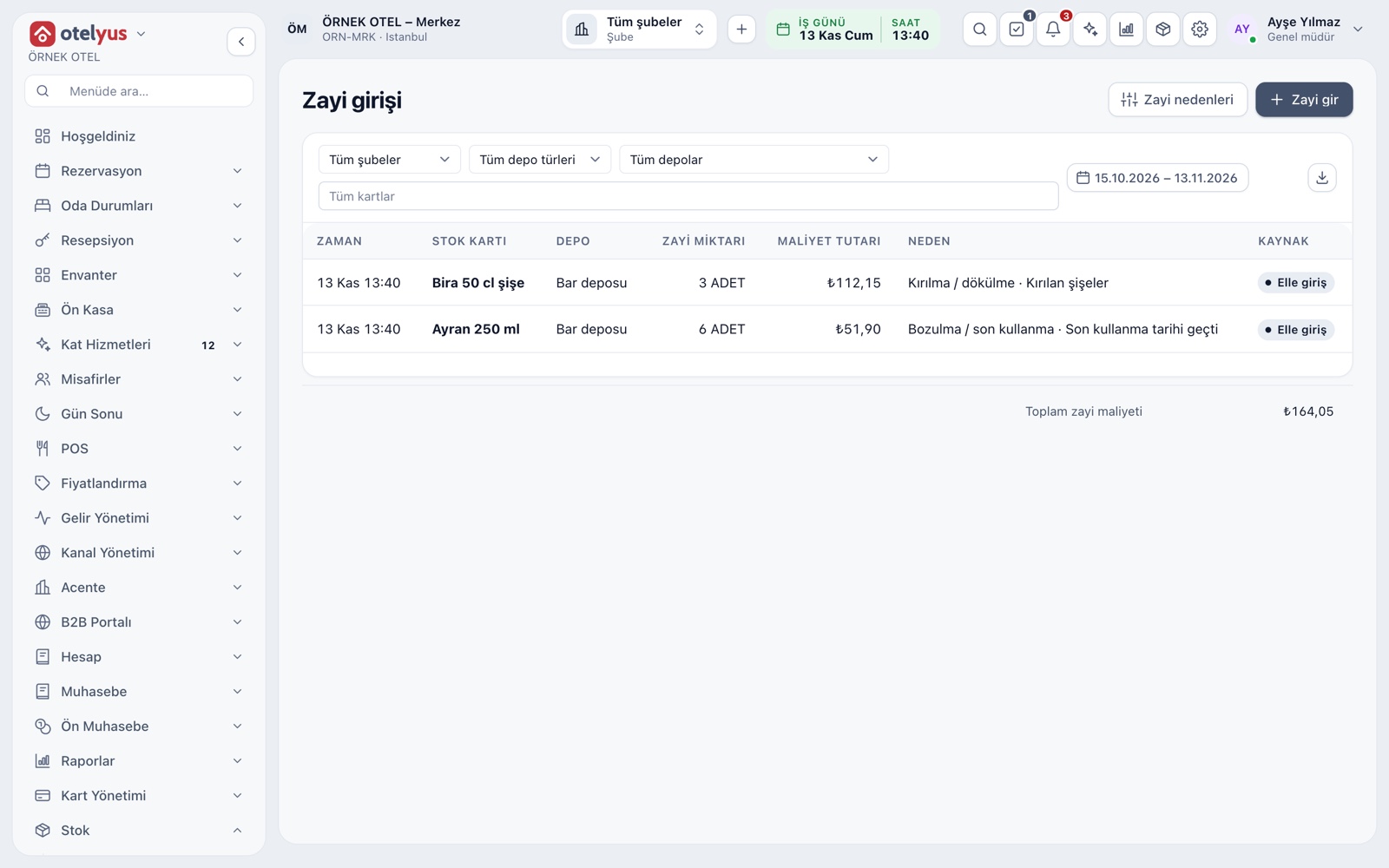
Record losses in the warehouse
The Stock > Waste entry screen records a loss in a warehouse. Pick the stock card, quantity and reason; stock is deducted immediately and the cost amount is written. The list shows every waste entry in the chosen range with the total waste cost.
- Filter by branch, warehouse, card and date
- A source column separates manual entries from losses logged on a check
- Export the list to Excel, CSV or PDF
Waste reasons
A reason is not free text; it is chosen from a list you define, so reports group meaningfully. Set up reasons such as breakage, spoilage, expiry and preparation error to fit your business. Each reason has a class: normal spoilage or write-off.
- Add, reorder and archive reasons
- A used reason is never deleted and keeps its name on old records
- One reason can be marked as the default
Normal spoilage versus write-off
Not every loss is booked the same way. Normal spoilage is the natural loss of production and goes into cost. A write-off is an unusual loss: it is booked as a loss and the deducted VAT on the goods is corrected. Because the class sits on the reason, whoever records it does not have to make an accounting decision.
- Normal spoilage feeds into product cost
- A write-off goes to a separate loss account in the period entry
- VAT correction needs the purchase VAT rate filled on the stock card
- Confirm which reason falls in which class with your accountant
Waste from a check
Sometimes the loss happens while the order is on the table: a plate drops, an item is made wrong. On the order screen you select the item and mark it Waste; a reason is recorded and the amount comes off the check total. The item stays on the check labeled Waste and is not charged.
- A waste item is not part of the amount due
- The waste permission is separate from deleting or voiding items
- End-of-day summary lists the waste count separately
Reports and accountability
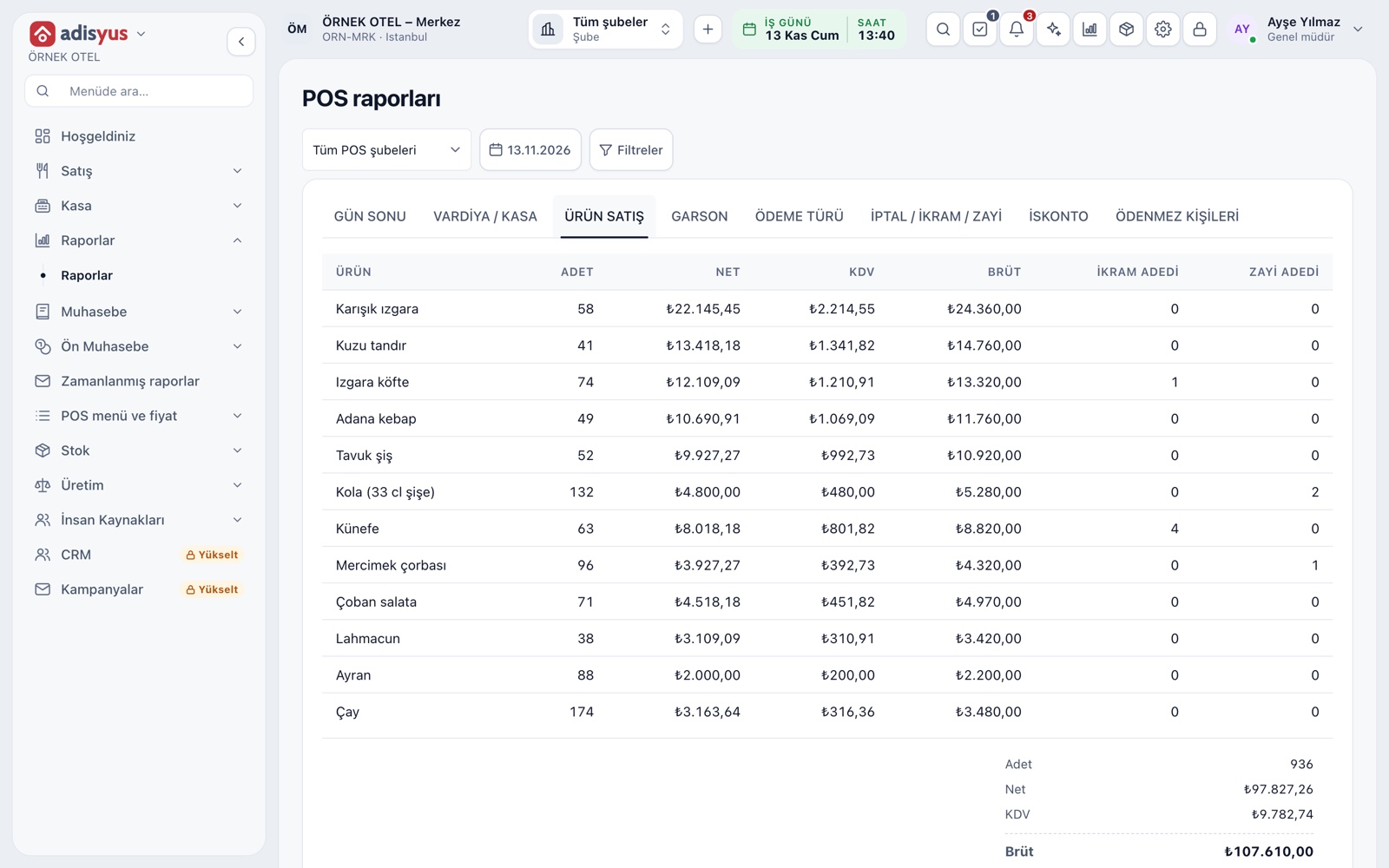
Every waste record carries who wrote it and why. The void / comp / waste report lists type, check, item, amount, reason, approver and time. You can later read which shift lost what, for which reason and how much.
- Product sales report shows comp and waste quantities side by side
- Reports filter by date and POS branch
- The more consistently reasons are used, the more useful the report
Stock, cost and accounting impact
If a sale already deducted stock, waste marked on the check moves that consumption into the waste class; the same item is never deducted twice. For recipe items, waste is costed through the ingredients. Spoilage and write-offs appear as separate lines in the period accounting entry.
- The consumption cost report shows sales, comps and waste apart
- An unexplained count difference is tracked separately from waste
- Permission to create the entry is separate from permission to record waste
Modules used together
Stock and Recipe Costing
Recipe-based costing, stock counts and waste tracking
Learn moreDiscounts and Comps
Predefined discounts and non-payable (comp) bills
Learn morePOS Reports
Product sales, end of day, shift, statistics, stock status and waste reports
Learn moreCost and Profitability Analysis
Product and menu profitability, report wizard
Learn moreUsers and Permissions
Waiter, kitchen, cashier and manager roles with a permission matrix
Learn moreFrequently Asked Questions
What is the difference between spoilage and a write-off?
Normal spoilage is the natural loss of production and goes into cost. A write-off is an unusual loss booked as a loss. Confirm which reason belongs in which class with your accountant.
Does food a guest left count as waste?
That is your decision. If a prepared item is marked as waste on the check, the amount comes off the total and its cost is reported as waste. A comp is a different thing: the item is given to the guest free.
Does stock drop automatically when I record waste?
Yes. Manual waste is deducted at once. For waste marked on a check, consumption already deducted by the sale moves into the waste class, so nothing is deducted twice.
Can I define my own waste reasons?
Yes. Reasons are set up under Settings, can be reordered and archived. A used reason is never deleted.
I only use adisyus. Does this work?
Yes. Waste entry and reasons use the same data across hotel, POS and events. Waste from a check belongs to the POS side.
Meet Waste and Spoilage
Let us call you for a live walkthrough, or try it free for 1 month.