
Fiscal Years and Periods
A fiscal year opens with twelve periods, and each period is open, closed or locked. Closing a period depends on a checklist, and VAT set-off and year-end closing are done step by step with a preview.
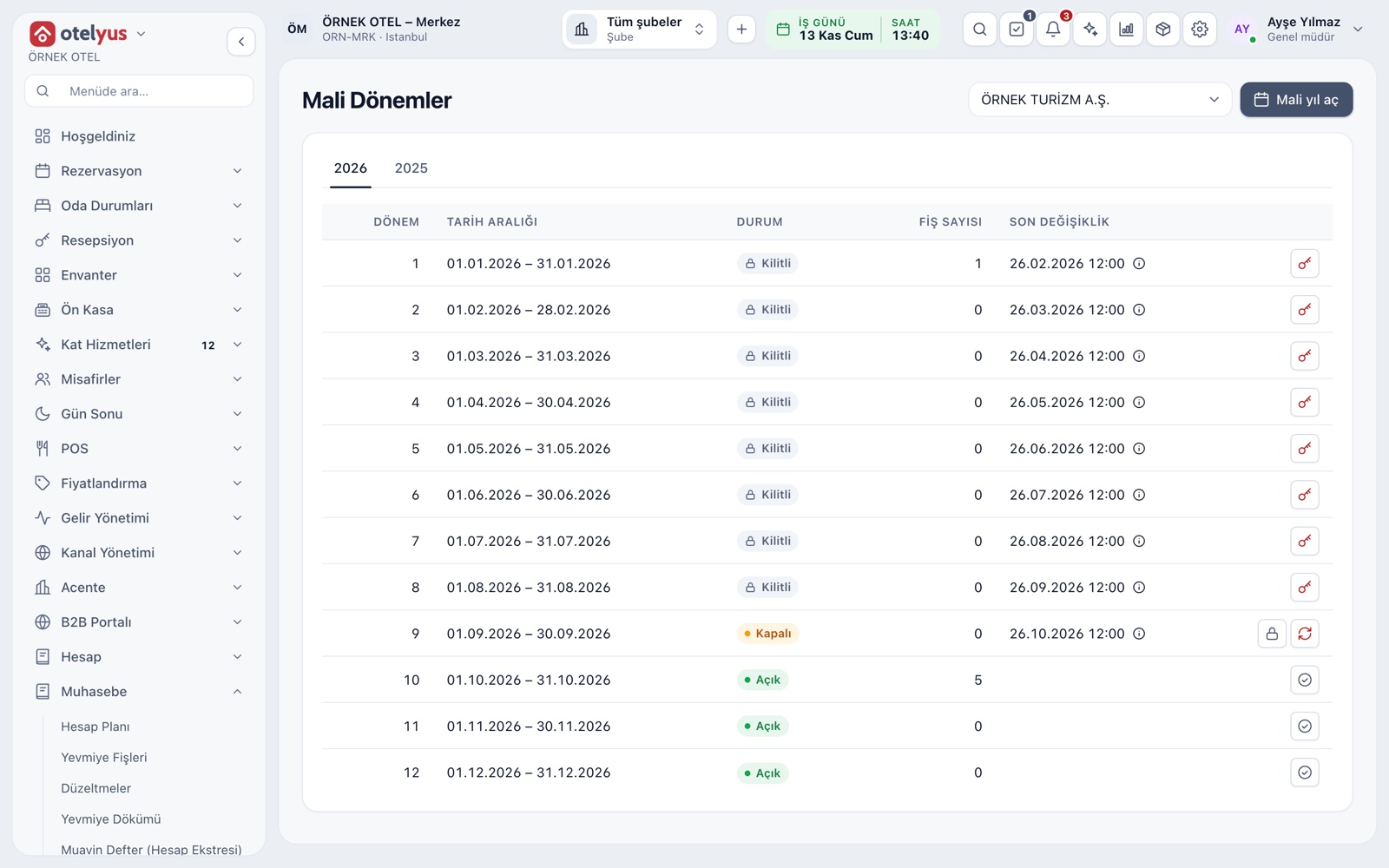
Open, Closed and Locked Periods
A fiscal year opens in one step with its twelve monthly periods open. Entries are posted in an open period. A closed period accepts no entries, but an authorised user can reopen it with a reason. A locked period is meant for after filing and year-end closing.
- Status is shown with an icon and colour.
- Closing, locking and reopening are separate permissions.
- Every status change is written to the audit trail with its reason.
- The fiscal year starts in January by default.
Period Close Checklist
The period-end page builds a checklist for each period: currency revaluation, depreciation, pending accruals, ledger balance, VAT set-off, provisional tax preparation and year-end closing. A period cannot be closed until the required steps are done.
- Steps show as Done, Pending or Not needed.
- The ledger balance step checks debit and credit totals.
- Required and informational steps are marked separately.
VAT Set-Off and Filing Flag
The VAT set-off step previews the period's output and input VAT, the carried-over amount and the amount payable or carried forward; the preview writes nothing. Once approved, the set-off entry is posted to the journal. Marking the return as filed locks the period.
- The return is not filed from this screen; only a flag is set.
- The filing date and approval number are saved for tracking.
- A posted set-off entry can be cancelled with a reversing entry.
Period-End Currency Revaluation
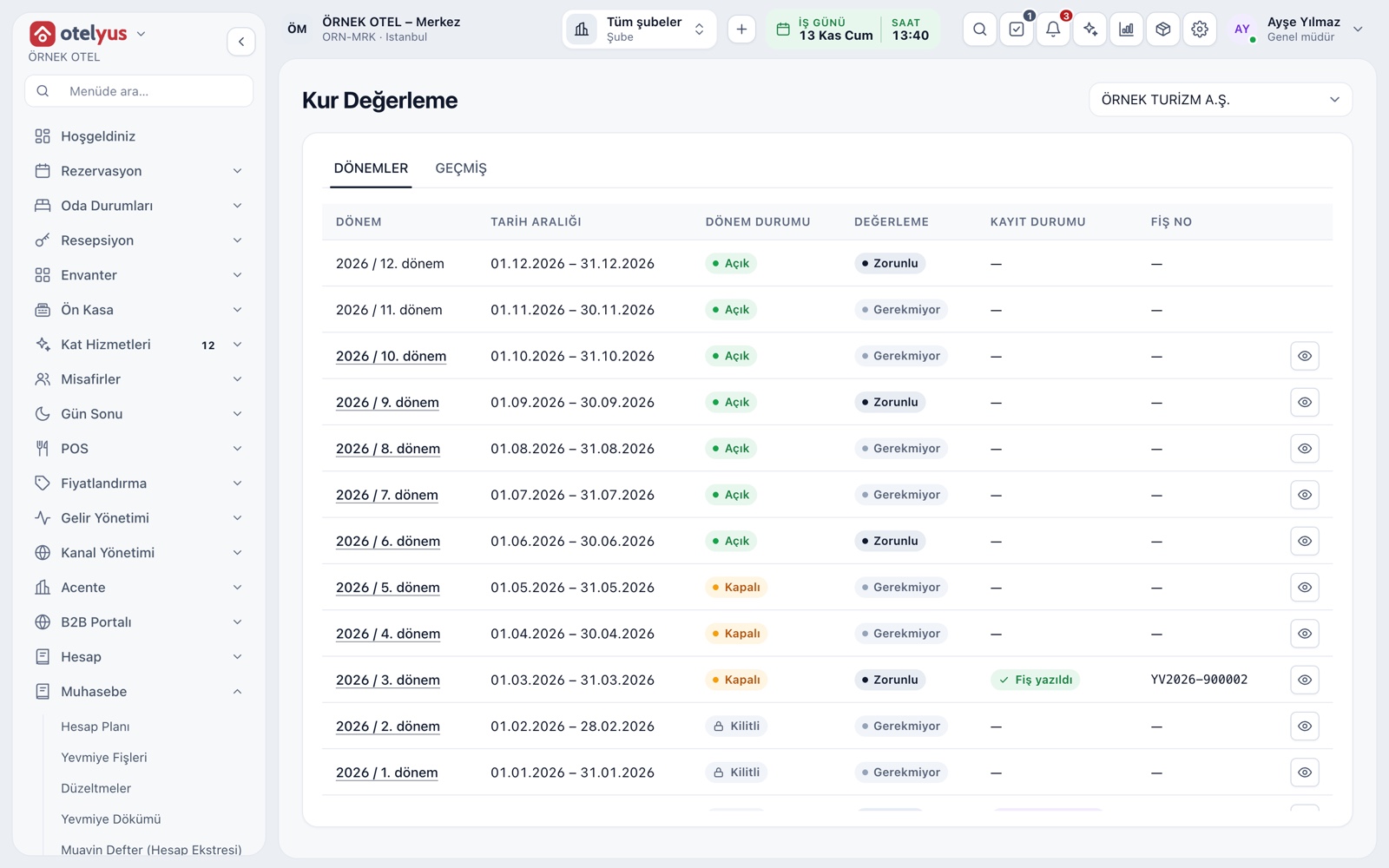
Monetary items in foreign currency are updated at the revaluation rate at period end. Revaluation is mandatory for year-end and provisional tax periods, and you can also run it monthly. The preview shows the status of each item, and the entry is posted only on approval.
- The exchange gain and loss accounts are set.
- Choosing a start-of-period reversal makes the revaluation temporary.
- Revaluation history is tracked with run and entry numbers.
Provisional Tax Preparation
Provisional tax preparation gathers cumulative income, expenses and the quarterly result for four quarters from the books, with filing and payment deadlines alongside. This screen is supporting data: no tax is calculated and no return is filed.
- If the books change after saving, the screen warns you.
- Cost and expense accounts can be transferred with an optional allocation entry.
- Each save is kept with a revision number.
Year-End Closing and Carry-Forward
Year-end closing closes the income and expense accounts and moves the period result to the right account. The carry-forward entry is a separate step: balance sheet accounts move to the new fiscal year. Both steps are previewed and can be undone with a reversing entry if needed.
- Your accountant calculates the tax provision amount.
- Cancelling the closing or undoing the carry-forward is written to the audit trail.
Filing Calendar
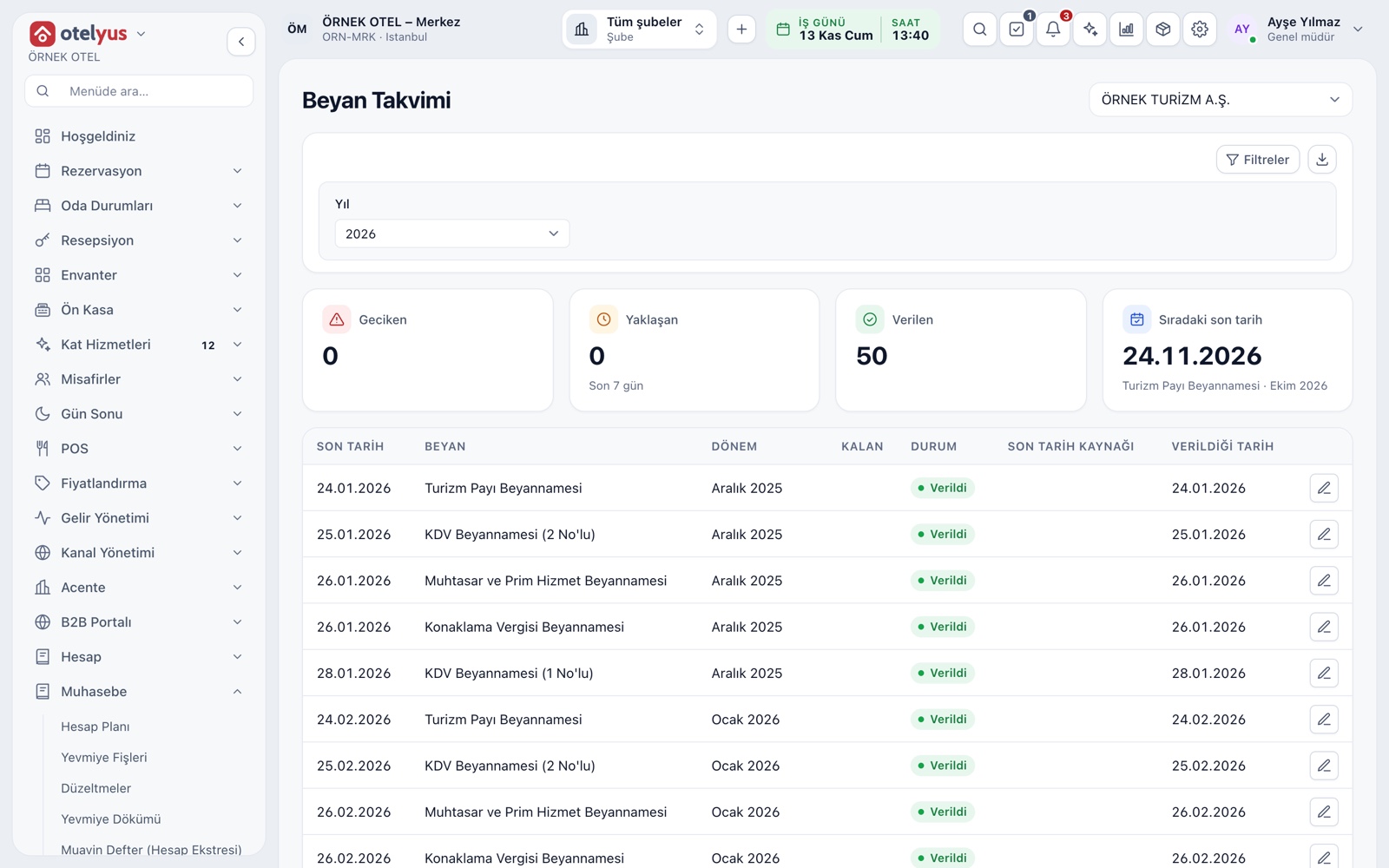
The filing calendar lists the deadline, days left and status of VAT, withholding and social security, provisional tax, accommodation tax and tourism share returns. A deadline falling on a weekend moves to the next working day; you enter public holidays and extensions by hand. Returns are not filed from this system; please confirm the dates with your accountant.
- Which returns are tracked is switched on in settings.
- The number of overdue returns shows as a warning at the top.
- A return nearing its deadline is marked Approaching.
Modules used together
Accounting
Uniform chart of accounts, trial balance and VAT
Learn moreJournal Entries and Corrections
Journal entry, corrections and voucher review
Learn moreTrial Balance and Financial Reports
Trial balance, balance sheet and income statement
Learn moree-Ledger Preparation
Journal and general ledger outputs
Learn moreTax, Withholding and Exemption Codes
VAT and accommodation tax rates are kept with their effective dates, and every line stores the rate of its transaction date. Withholding and exemption codes are checked on the invoice before it is issued. Confirm rates and dates with your accountant.
Learn moreFrequently Asked Questions
What is the difference between a closed and a locked period?
A closed period accepts no entries, but an authorised user can reopen it with a reason. A locked period is for after filing and year-end closing; only a user with critical authority can lift the lock, with a reason.
What must be completed before closing a period?
The required checklist steps, such as ledger balance and VAT set-off, must be done before the period can be closed.
What if I post the year-end closing wrongly?
The closing and the carry-forward are undone with a reversing entry and recorded in the audit trail.
What does the Return filed flag do?
It locks the period, which must be closed first. It does not file anything; it is only for tracking.
Meet Fiscal Years and Periods
Let us call you for a live walkthrough, or try it free for 1 month.