
Modifiers and Option Groups
Doneness, side dish, sauce, extras: option groups decide how an item is served. Single or multiple choice, requirement and extra price are defined once, and servers ask the right question when taking an order.
What an option group is
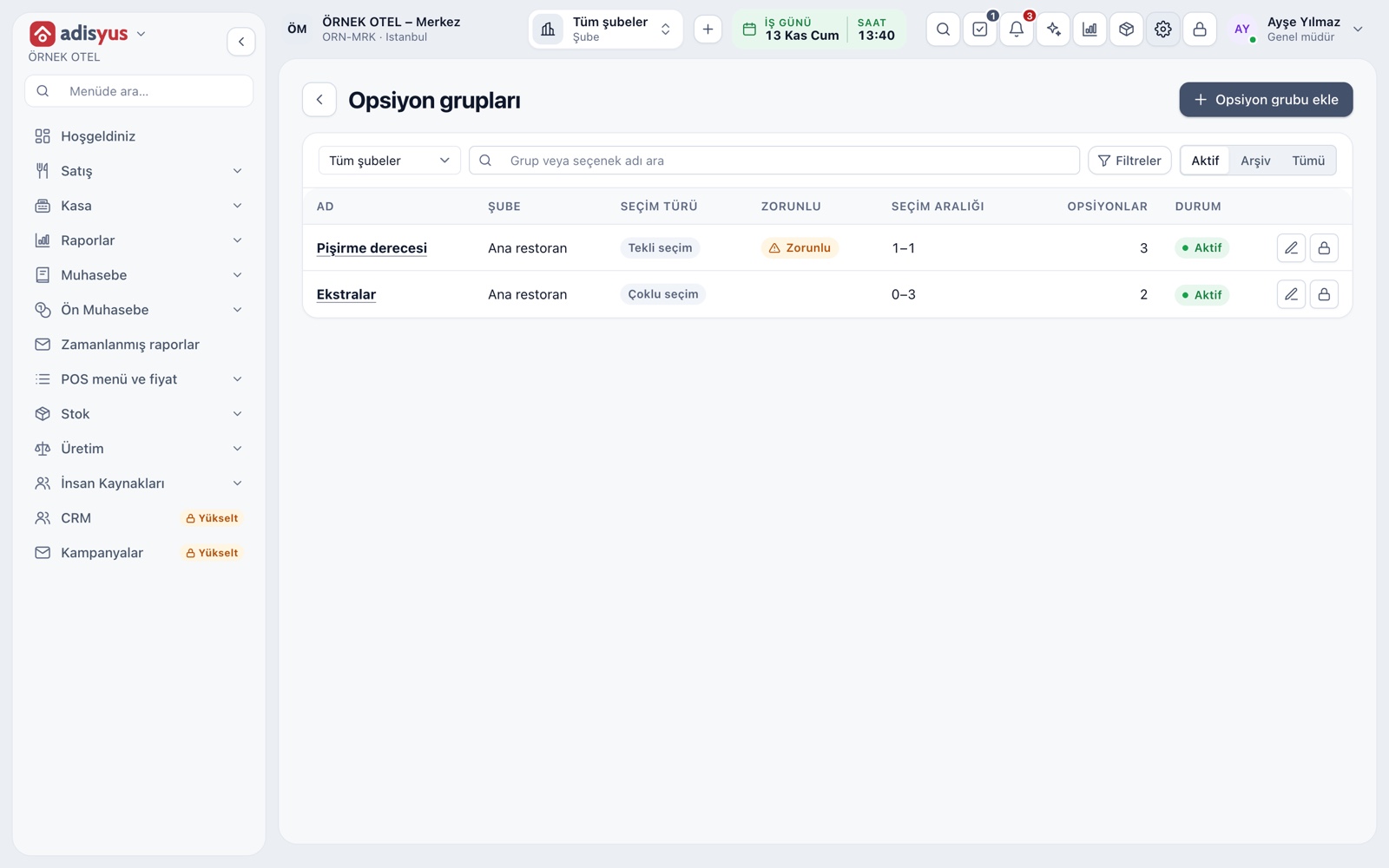
An option group is a list of choices linked to an item and asked during ordering. On the Settings > POS > Option groups screen you define the group name, the outlets where it applies, the choice type and the options inside. The same group can be linked to many items, and you make a change once.
- Search by group or option name.
- Filter by choice type and requirement.
- Option groups are copied along when the menu is copied to an outlet.
Single, multiple and required choice
In a single choice the guest picks only one from the list: rare, medium, well done. In a multiple choice several options can be taken: extra cheese, mushrooms. The selection range is limited by minimum and maximum values. In a required group the item cannot be added to the check until a choice is made, so no steak reaches the kitchen without a doneness.
- A required group is marked with a Required badge in the list.
- A required group must have at least one option.
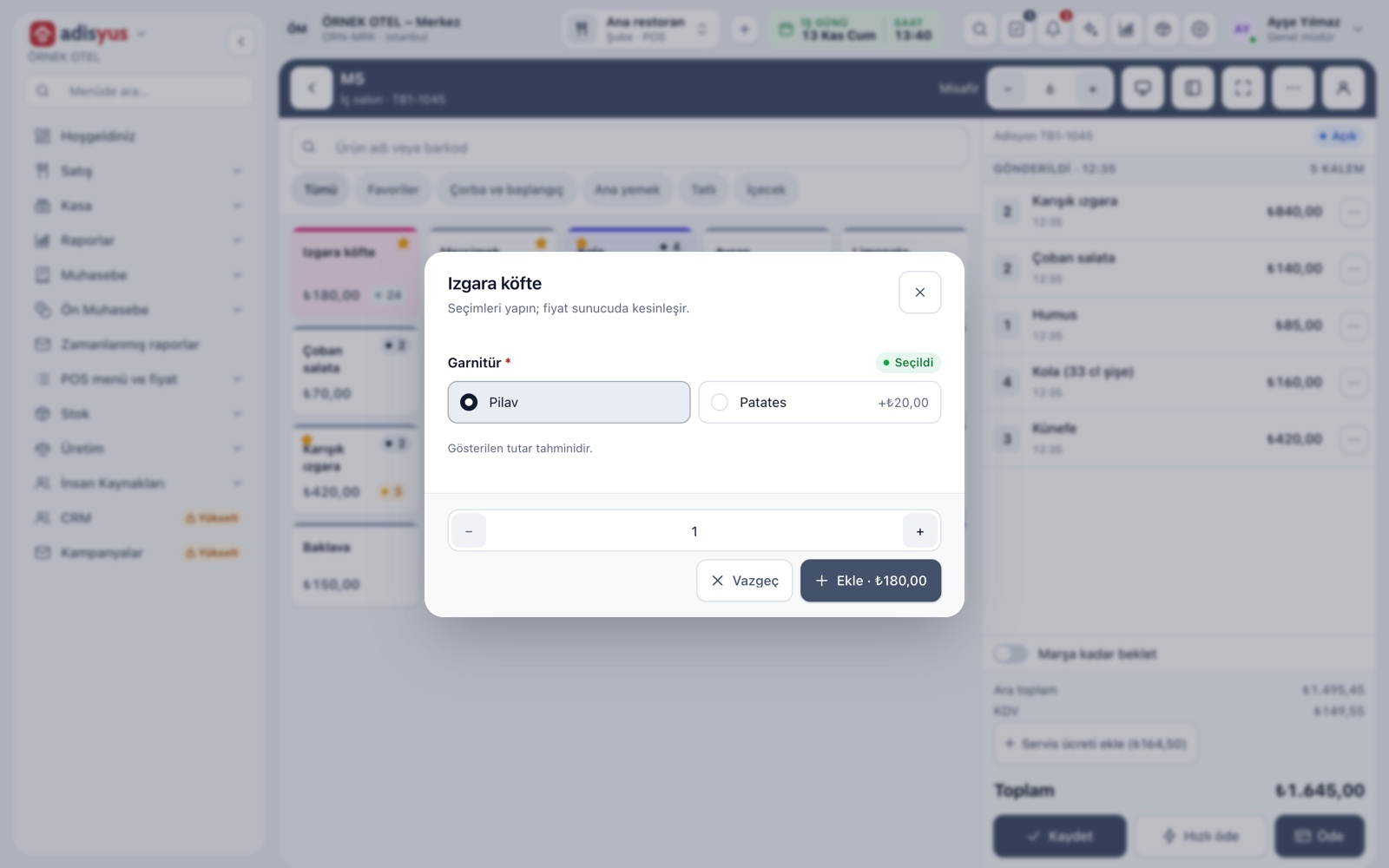
- If you tap Add with a choice missing, the missing group is highlighted.
Extra price and order type
An option can add to the item's price: extra cheese, a large portion of sauce, the difference for rice instead of fries. The same option can have a different extra price for dine-in, takeaway, delivery or platform orders. The default-selected mark keeps the most common choice ready on the first tap.
- An option with a zero extra price is free.
- Servers never type the price themselves.
- The total shown in the dialog is an estimate.
Ingredients to remove
An ingredient the guest does not want is also defined as an option: no onion, no pickles, no sauce. You open a multiple-choice group and add zero-price options to it. The server ticks what to remove; the choice shows under the item on the check and goes to the kitchen ticket as it is.
- For a request not in the list, a line note is written.
- Choices appear on the kitchen display and printed slip.
Linking to an item and asking automatically
A group is linked to an item from the Sales section of the item card; up to 20 groups can be linked to an item. With the ask-automatically switch on, the choice dialog opens by itself when the item is tapped. The dialog also gathers portion and combo choices in the same place.
- For an item with portions, the portion is asked as the first group.
- Combo rows appear as separate groups in the same dialog.
- The item's quantity is also set in the choice dialog.
Choices reaching the kitchen
The server's choices are kept on the check line and carried to the ticket as they are. The kitchen display shows the options under the item name. When you remove an option, it is not deleted but deactivated; past checks keep reading with their old choices.
- Option names and item notes appear together on the ticket.
- The permission to define is separate from the permission to order.
- To change the options of a sent line, cancel the line and add it again.
Modules used together
Menu and Product Management
Categories, products, photos, favorites and sales status
Learn moreChecks and Order Entry
Item entry, options, comps, split and merge bills
Learn moreKitchen Display and Kitchen Groups
Station-based kitchen display (KDS) and preparation times
Learn moreUnits and Portions
Full, half, one and a half, piece, kilogram
Learn moreSmart Digital Menu
Order from the table with a QR menu
Learn moreFrequently Asked Questions
What is the difference between an option and a line note?
An option is a predefined choice that can carry a price and be reported on. A line note is free text, used for special requests not in the list, and is added to the ticket.
Can making a choice required stop an item from being sold?
If a required group has no options, yes; so the screen blocks saving a required group without at least one option.
Does an option deduct from stock?
Option choices carry through to price, check and kitchen ticket; stock deduction runs through the item and its recipe. No separate ingredient is linked to an option.
Can I link the same group to several items?
Yes. You link a group such as doneness to all grill items, and editing the group once updates them all.
Meet Modifiers and Option Groups
Let us call you for a live walkthrough, or try it free for 1 month.