
VAT Rates
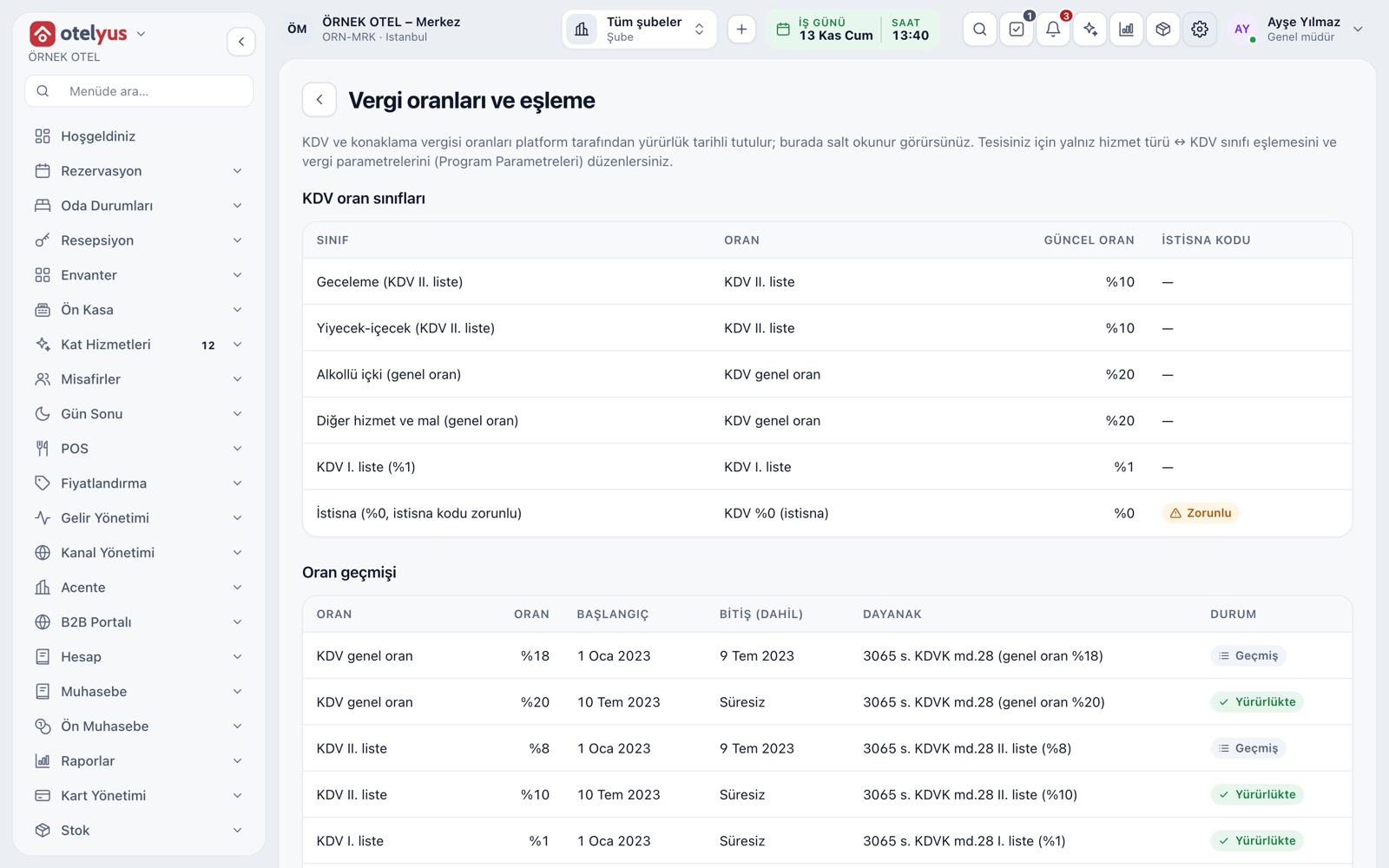
VAT rates are kept current by the platform with their effective dates; you assign the right VAT class to products and categories. When a rate changes, past checks are not recalculated, and the day-end and declaration summary show each rate separately.
VAT rate classes
Instead of typing a rate you pick a class: food and beverage, alcoholic drinks, other services and goods, exempt and so on. The platform manages the rates and you see them read-only on screen, so there is no risk of typing a wrong rate.
- Each class lists its linked rate and current value.
- Alcoholic drinks are a separate class.
- An exempt class requires an exemption code.
- Decide which item fits which class with your accountant.
Effective-dated rate history
When the regulation changes, the new rate is written with a new start date by closing the previous record. The change applies from today and does not recalculate past documents: last month's check keeps the rate that applied that day.
- A future-dated rate can be entered ahead and applies when its date arrives.
- You do not need to correct your products one by one.
- Confirm the current regulation with your accountant.
Category and product VAT class
A VAT class is required for every product. For convenience a category gets a default class; a new product in the category takes it and you change it on the product if needed. The Beverages category can be general, and you link an alcoholic product to the alcohol class separately.
- The class is chosen in the General section of the product card.
- Changing a product's price does not affect its VAT class.
Exemption and withholding codes
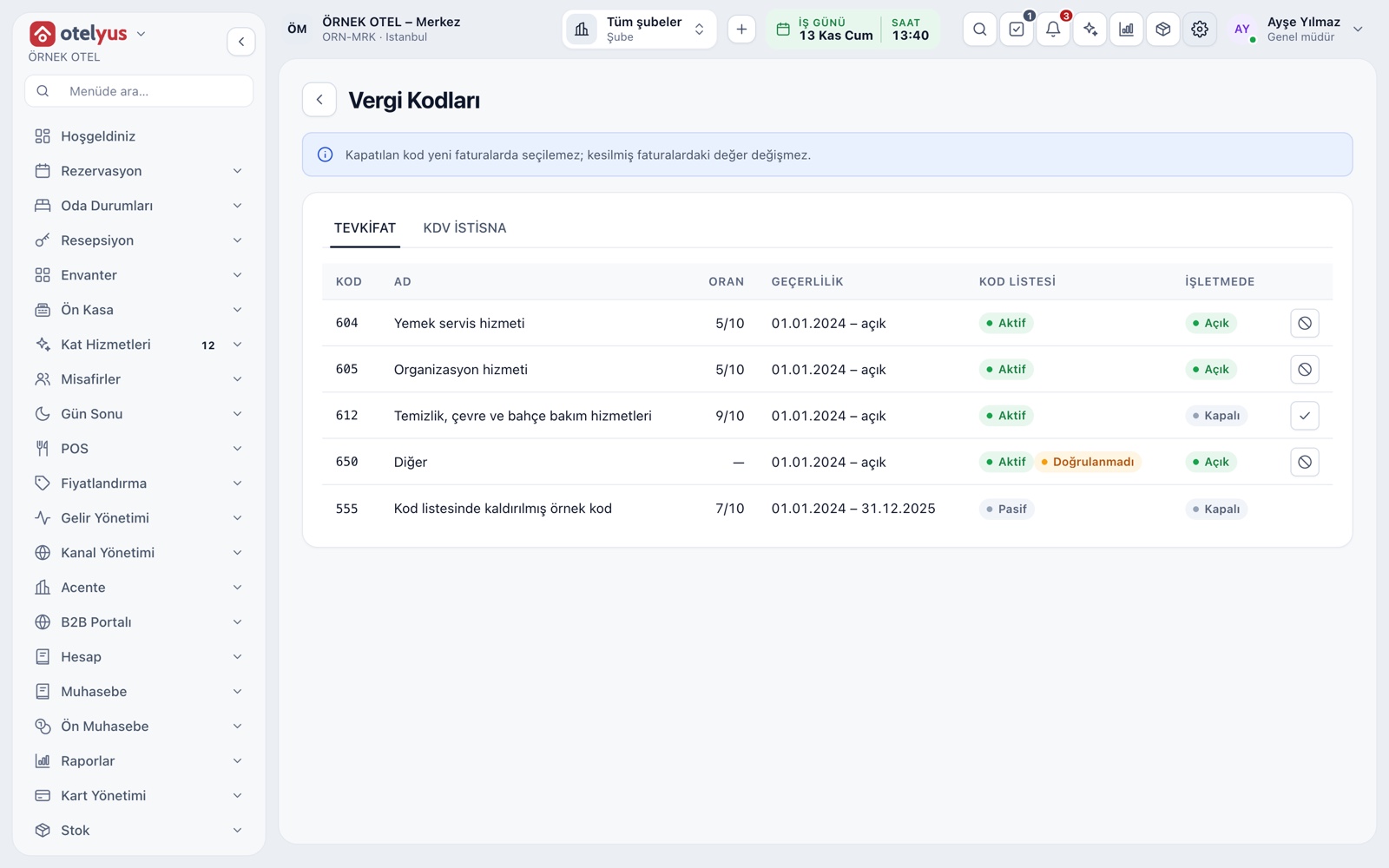
Exemption and withholding codes come into play when you invoice a company. The tax codes screen lists the code, name, rate and validity date. A code you switch off cannot be chosen on new invoices, and the values on issued invoices do not change.
- The code list comes from the platform.
- You switch each code On or Off for your business.
- Document type, series and finalizing are done in the Invoice section.
VAT-inclusive or exclusive prices
Each price list records whether amounts are entered with or without VAT. Whoever builds the menu enters prices the way they are used to, and the order screen and slip calculate the amount correctly. On the check total, subtotal, VAT and grand total are separate lines.
- Servers never calculate VAT at any stage.
- Showing prices without VAT on the sales screen only changes the display.
Day-end VAT breakdown
The day-end summary splits gross sales by VAT rate: net, VAT and gross for each rate. Refunds, service charge, net collection and held tips are separate lines. Once the day closes the summary freezes, so your document does not change afterwards.
- The VAT of comps and staff meals follows your POS settings.
- A refund with items selected uses each item's own rate.
- The day-end slip can be printed.
VAT declaration summary
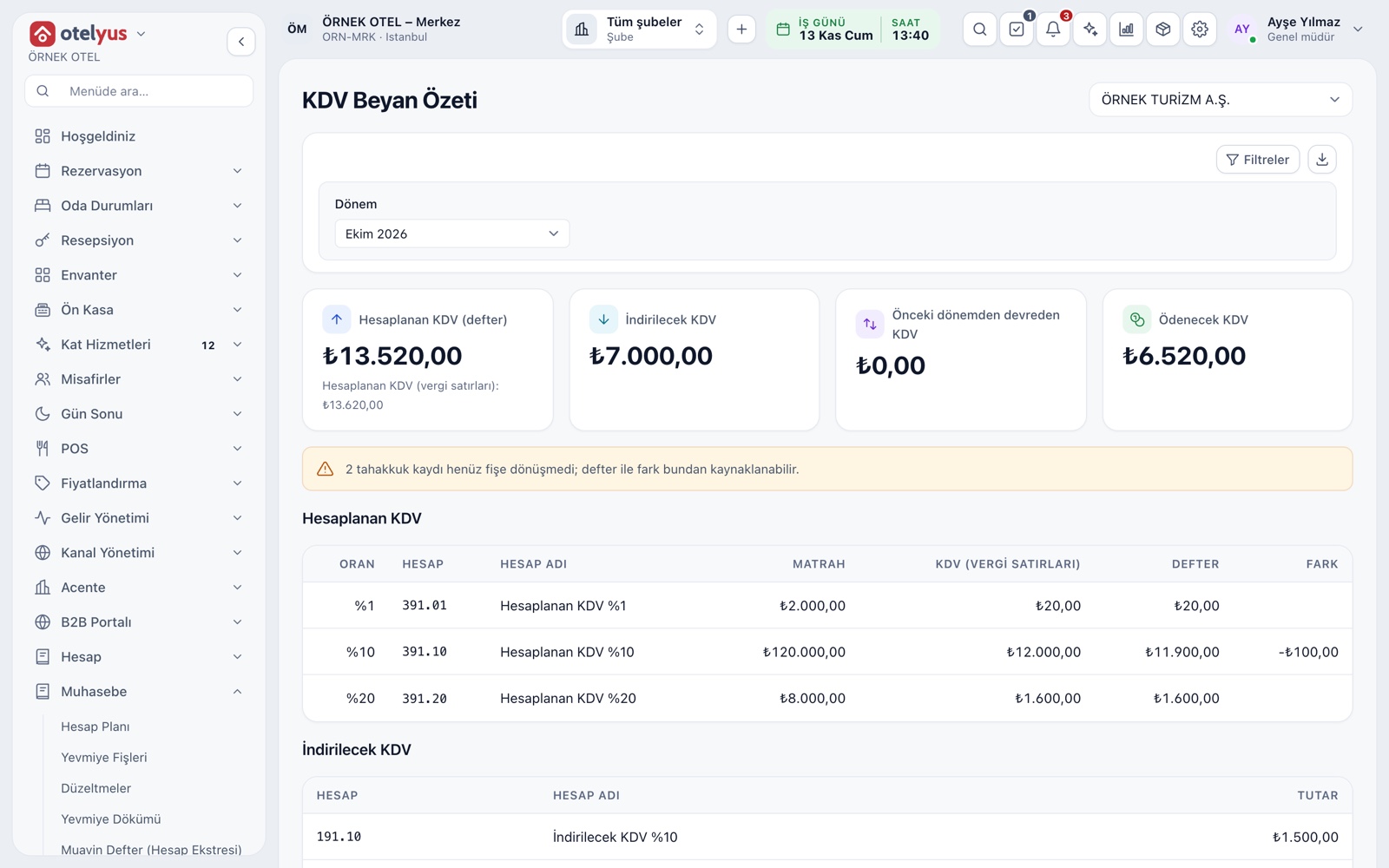
Sales VAT is gathered in the VAT declaration summary under Accounting: calculated VAT by rate, deductible VAT and the amount payable. The summary is informational; no return is submitted, and you hand your accountant a ready basis.
- You pick the period and can download the summary.
- A warning appears for accruals that have no journal entry.
- Calculated VAT shows the gap between tax lines and the ledger.
Modules used together
Menu and Product Management
Categories, products, photos, favorites and sales status
Learn morePayments and Collections
Cash, card and split payments; fiscal cash register (ÖKC) integration
Learn moreDiscounts and Comps
Predefined discounts and non-payable (comp) bills
Learn moreStock and Recipe Costing
Recipe-based costing, stock counts and waste tracking
Learn morePOS Reports
Product sales, end of day, shift, statistics, stock status and waste reports
Learn moreFrequently Asked Questions
What do I need to do when a VAT rate changes?
The platform updates rates with their effective dates. Your products are tied to a class, so you do not change them one by one. The new rate applies from its start date and past checks stay as they are.
Should I enter prices with VAT included?
You choose per price list. Entering prices with VAT is easy because it matches what servers and guests see. Either way the VAT amount is calculated and shown as a separate line on the check.
Is there a separate setting for alcoholic drinks?
Yes. Alcoholic drinks are a separate VAT class; you link an alcoholic product to it on the product. Confirm which product belongs to which class with your accountant.
Does the system submit the VAT return?
No. The VAT declaration summary is informational and gives your accountant a basis; no return is submitted.
Meet VAT Rates
Let us call you for a live walkthrough, or try it free for 1 month.