
Supplier Payables
Supplier payables arise from an incoming e-invoice or a purchase invoice you enter, and are posted to the supplier account on approval. Ageing and due alerts show what to pay and when; a payment voucher settles it.
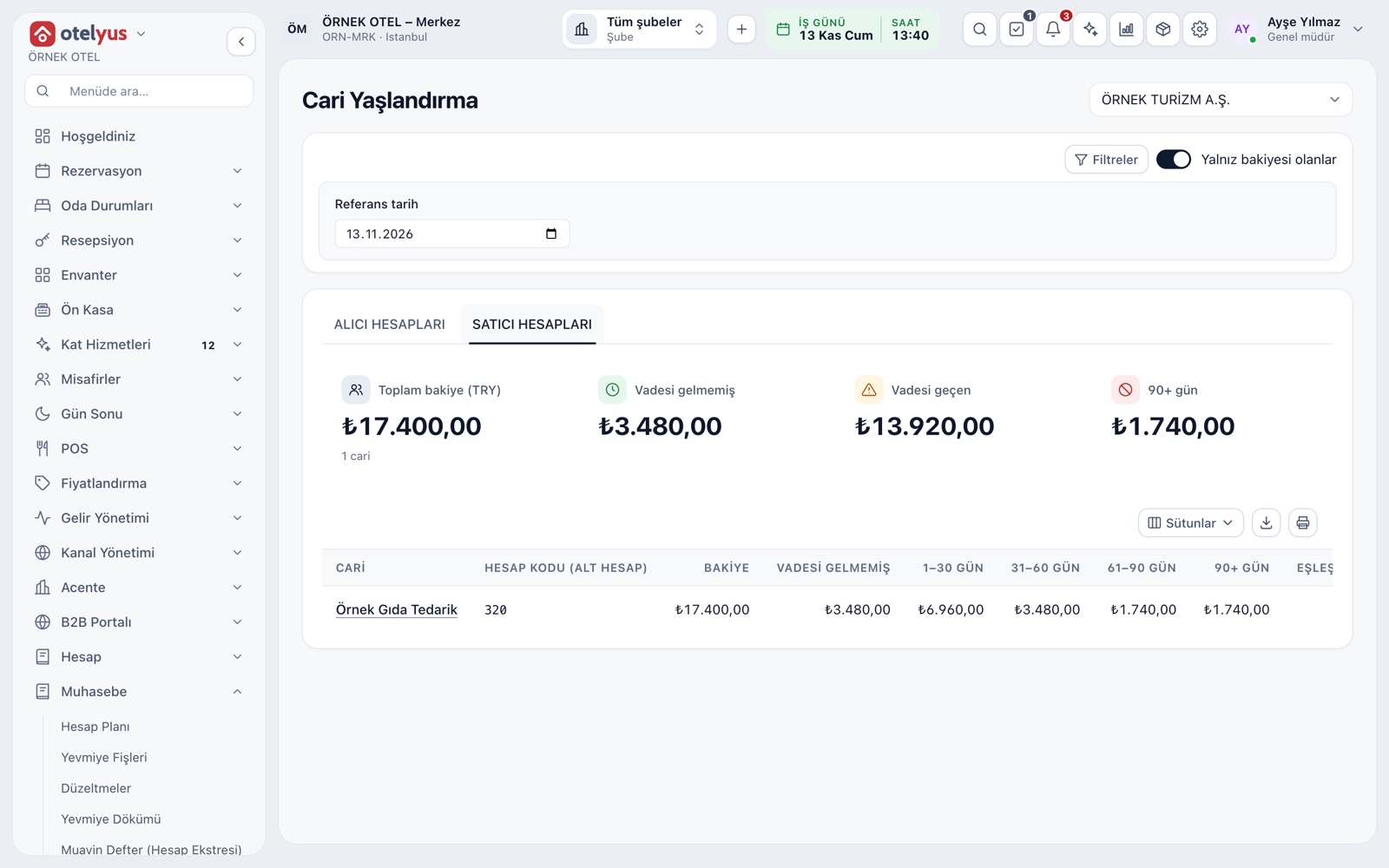
Your payables by due date
Supplier ageing splits what you owe into current (not due), 1–30, 31–60, 61–90 and over 90 days. The cards on top show the total balance, the overdue amount and what is past 90 days. Each row shows the supplier's oldest due date.
- Customer and supplier accounts sit on separate tabs.
- Show only suppliers with a balance, if you prefer.
- The report can be exported and printed.
- Unmatched payments (advances) get their own column.
An account for every supplier
Each supplier gets a payable account in accounting, and what you owe is tracked there. The payment term and currency are set when the account is opened. A purchase invoice from a supplier without such an account cannot be approved.
- The same tax number cannot appear on two accounts.
- The tax number on an incoming invoice is matched to the supplier card.
- Balances are also tracked in TL equivalent.
From incoming e-invoice to payable
The e-invoice your supplier issues lands in your inbox, the sender's tax number is matched to the supplier card, and a purchase invoice draft is built from the document. On approval, the journal entry and the supplier payable are posted, so the debt is recorded once, against the right supplier.
- Commercial invoices can be accepted or rejected.
- A purchase invoice cannot be created from a rejected document.
- A disregarded document stays out of accounting and can be restored.
Accounting preview before approval
On a purchase invoice you set each line's expense or stock account, VAT rate and deductibility. Before approval, the accounting preview shows exactly how the entry will be posted. The person who prepared an invoice cannot approve it unless you change that setting.
- Approval is blocked if the entry is unbalanced or mapping is missing.
- An approved invoice cannot be edited; actions stay in its history.
- A return draft can be prepared from an incoming invoice and lowers the debt.
- For suppliers who issue no invoice, create an expense slip or e-producer receipt.
Payment tracking by due date
Open items show which document falls due when and how late it is, and due alerts list payments that are coming up or overdue. You decide whom to pay first from this view. It is a tracking screen, not a payment order.
- Choose how many days ahead counts as coming due.
- The summary gives overdue and soon-due amounts by currency.
- Due dates come from the document date plus terms, or from the date on the document.
Payment voucher and offset
When you pay a supplier, the payment voucher debits the supplier account and credits your cash or bank account. The payment is matched to open items, and an unmatched payment shows as a separate advance balance. If the same company is both supplier and customer, the balances can be offset.
- A wrong voucher is reversed, and the reason is recorded.
- A wrong match can be undone, reopening the documents.
- On a foreign-currency account, the TL value uses the rate on the voucher date.
- At period end, foreign-currency balances are updated by a revaluation entry.
Modules used together
Account (Ledger) Management
Customer, supplier and agency accounts, opening entries
Learn moreSales and Purchase Invoices
Issue invoices, purchase invoices, cancellations and returns
Learn moree-Invoice and e-Archive
Electronic documents sent through an integrator
Learn morePayments and Receipts
Collection and payment vouchers
Learn morePurchasing
Requests, orders and receiving
Learn moreFrequently Asked Questions
Where do I see what I owe a supplier?
On the Supplier accounts tab of the account ageing page. It shows the total balance, current and overdue amounts, and each supplier's ageing buckets.
Does the system send the payment to the bank?
No. Payments are recorded and tracked here. It does not send payment orders to your bank; you make the payment from your own bank.
What happens if I reject an incoming invoice?
The rejection reaches the supplier as an e-document and cannot be undone. If you simply do not want to book it, use Disregard, which can be reversed.
Can the person who prepared a purchase invoice approve it?
Not by default; a different authorised person approves. Small businesses with a single accountant can relax this rule on purpose.
How are foreign-currency payables revalued?
At period end, through a revaluation preview. The entry is posted on your approval; agree the valuation rate with your accountant.
Meet Supplier Payables
Let us call you for a live walkthrough, or try it free for 1 month.