
+90 (850) 302 6000 · We'll call you
POS

One POS for restaurants, cafes and bars, from order to bill

adisyus is a cloud POS and check system that puts the table plan, orders, kitchen, till and end of day on the same screens. It works the same on a tablet, a till or a computer.

All features

Every feature page shows what it does, with screenshots.

Restaurant POS

Check, table plan, cashier and end of day

Learn more

Table Plan and Zones

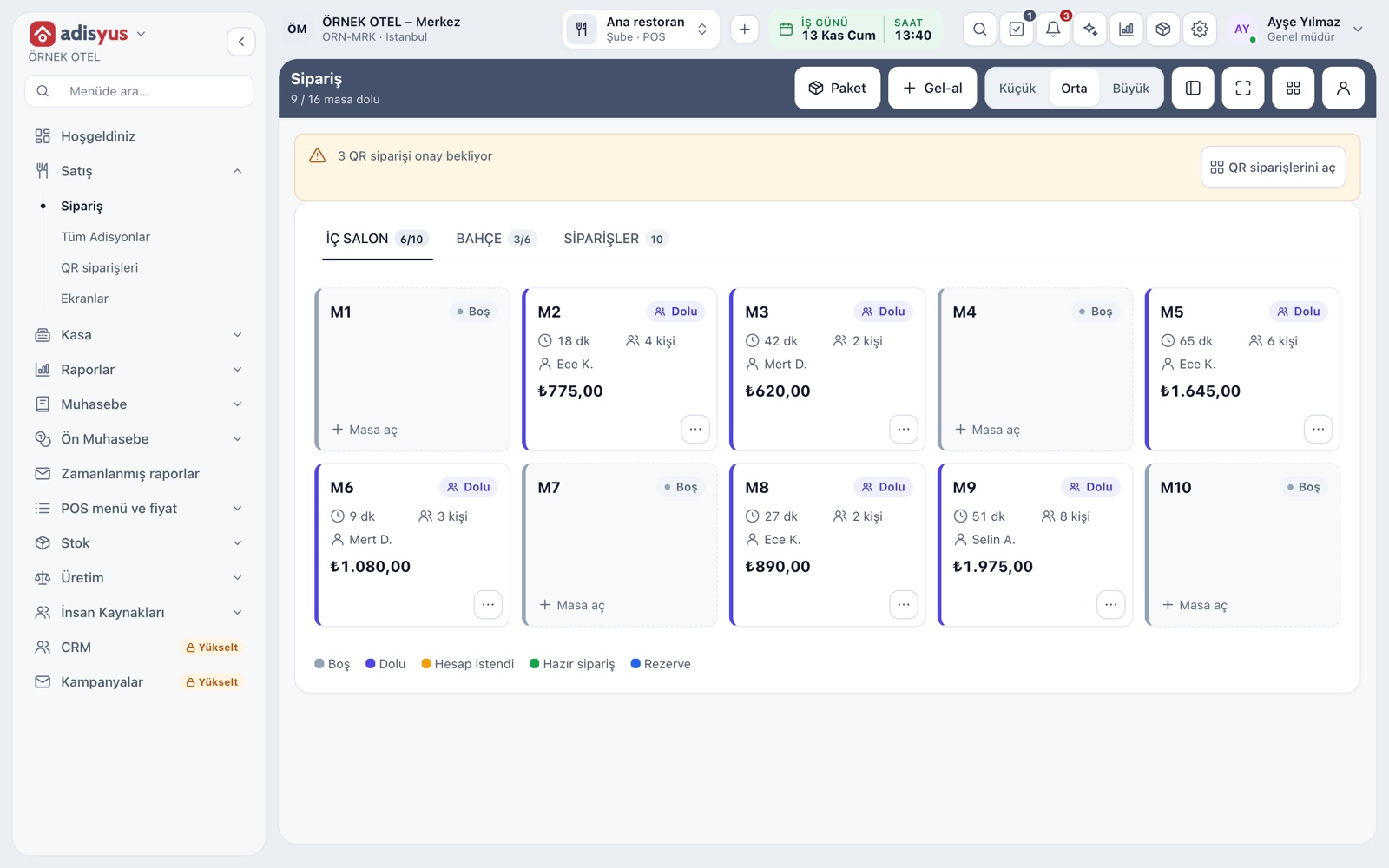
Freely editable floor plan, zone tabs, table statuses

Learn more

Checks and Order Entry

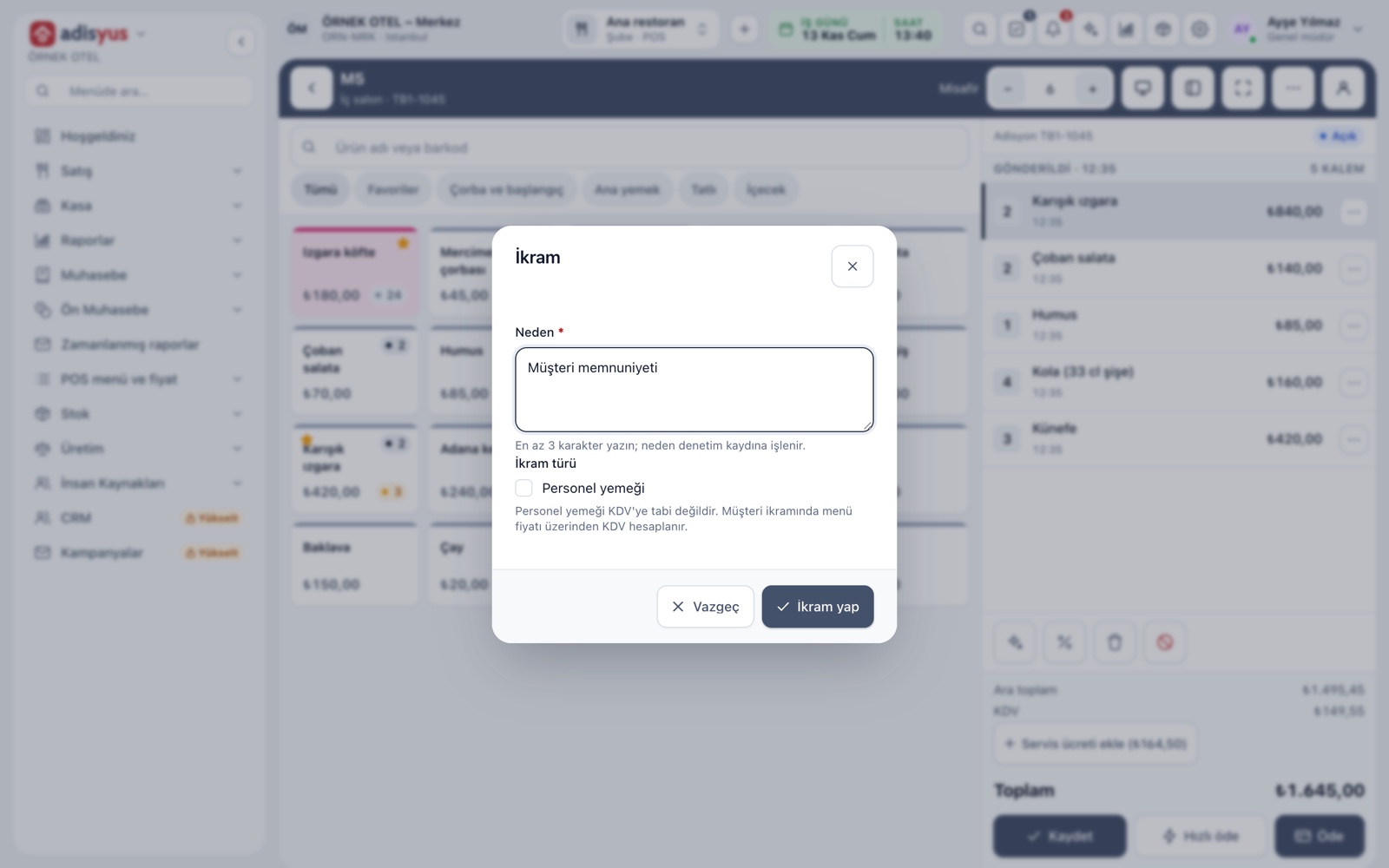
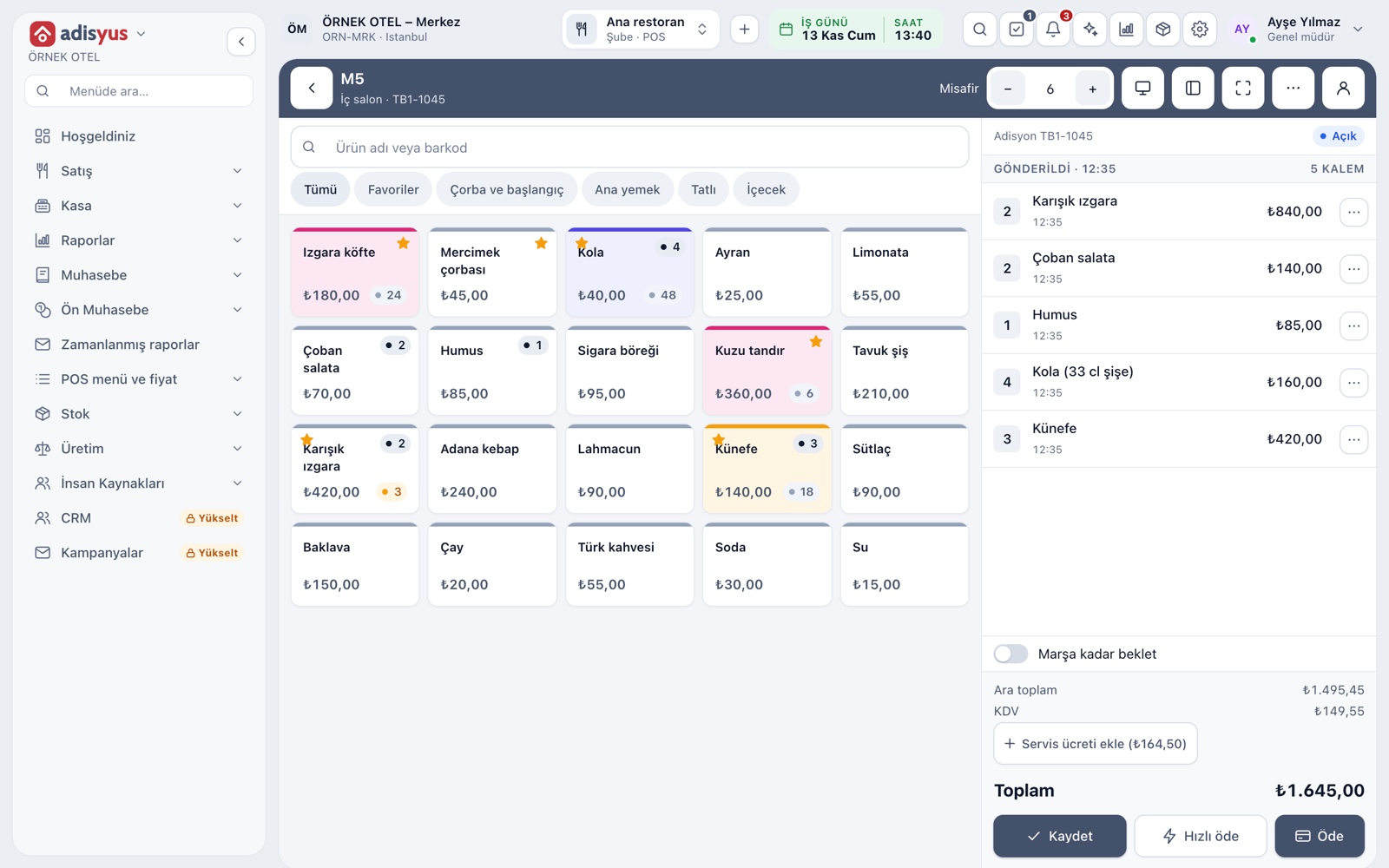
Item entry, options, comps, split and merge bills

Learn more

Delivery and Takeaway Orders

Track the order flow on a kanban board

Learn more

Kitchen Display and Kitchen Groups

Station-based kitchen display (KDS) and preparation times

Learn more

Smart Digital Menu

Order from the table with a QR menu

Learn more

Cover Charge and Service Fee

Cover charge and service fee rules, added automatically

Learn more

Phone System and Caller ID

Incoming calls appear as notifications, match a guest and are logged

Learn more

Payments and Collections

Cash, card and split payments; fiscal cash register (ÖKC) integration

Learn more

Post to Room Account

The restaurant bill is posted to the hotel folio

Learn more

Customers and House Accounts

Account customers, balances and open account tracking

Learn more

Discounts and Comps

Predefined discounts and non-payable (comp) bills

Learn more

Menu and Product Management

Categories, products, photos, favorites and sales status

Learn more

Modifiers and Option Groups

Single/multiple choice, extras and removed-ingredient groups

Learn more

Units and Portions

Full, half, one and a half, piece, kilogram

Learn more

VAT Rates

Tax groups and product-level VAT

Learn more

Stock and Recipe Costing

Recipe-based costing, stock counts and waste tracking

Learn more

Expense Tracking

Cashier expenses and expense types

Learn more

Waste and Spoilage

Waste reasons, responsible staff and cost impact

Learn more

Supply and Goods Receipt

Low-stock alerts, goods receipt by delivery note, incoming e-invoices and supplier accounts

Learn more

Printers and Receipt Design

Printer roles, routing rules and receipt templates

Learn more

Customer Display

Show the order and promotions on a second screen

Learn more

Delivery Platform Orders

Platform orders are handled as delivery orders with a separate price list

Learn more

Restaurant Online Reservations

Table reservations from your website

Learn more

Multi-branch and Offline Mode

Branch reports; keeps working when the internet is down

Learn more

POS Reports

Product sales, end of day, shift, statistics, stock status and waste reports

Learn more

Cost and Profitability Analysis

Product and menu profitability, report wizard

Learn more

Users and Permissions

Waiter, kitchen, cashier and manager roles with a permission matrix

Learn more

Restaurant Settings

Business day start/end, notifications, display and general settings

Learn more

Accounting

Uniform chart of accounts, trial balance and VAT

Learn more

Chart of Accounts and Groups

Chart of accounts, account groups and account types

Learn more

Journal Entries and Corrections

Journal entry, corrections and voucher review

Learn more

Trial Balance and Financial Reports

Trial balance, balance sheet and income statement

Learn more

Fiscal Years and Periods

Open, close and lock periods

Learn more

e-Ledger Preparation

Journal and general ledger outputs

Learn more

e-Invoice and e-Archive

Electronic documents sent through an integrator

Learn more

Sales and Purchase Invoices

Issue invoices, purchase invoices, cancellations and returns

Learn more

Account (Ledger) Management

Customer, supplier and agency accounts, opening entries

Learn more

Supplier Payables

Supplier balances and payment plans

Learn more

Payments and Receipts

Collection and payment vouchers

Learn more

Bank Accounts and Cash Boxes

Bank account and cash box definitions

Learn more

Inventory Management

Stock cards, warehouses, critical stock and movements

Learn more

Goods Receipt and Warehouse Transfers

Receiving and transfers between warehouses

Learn more

Recipes and Production

Recipe definition and recipe production voucher

Learn more

Stock Count and Excel Import

Stock counts and bulk Excel import

Learn more

Purchasing

Requests, orders and receiving

Learn more

Staff and Time Attendance

Zone QR and location-based check-in/out (personelyus)

Learn more

Integrations and Add-ons

Payments, e-documents, SMS and AI add-ons

Learn more

Staff App

Zone QR and location-verified check-in/out

Learn more

Identity and Access Management

Users, roles, sessions and single sign-on (SSO)

Learn more

A live view of your floor

On the service screen every dining zone is a tab, and tables show as cards with their status, elapsed time, server and amount. Tap an empty table to open a check, or a busy table to go to its check. Move, merge or split a table when guests change seats.

  • Tables show as a card list or on the floor plan you drew
  • An order ready from the kitchen is marked on the table card
  • An open table with no activity for a while is flagged

Fast ordering and checks

On the order screen the menu is on the left and the check on the right. Tap an item, choose portion and options, and Save sends the order to the right station. Comps, discounts and voids depend on permission and are recorded with a reason.

  • Items are found by name or by barcode
  • The bill splits by item or evenly per person
  • The event history of every check can be read

Kitchen display and printer routing

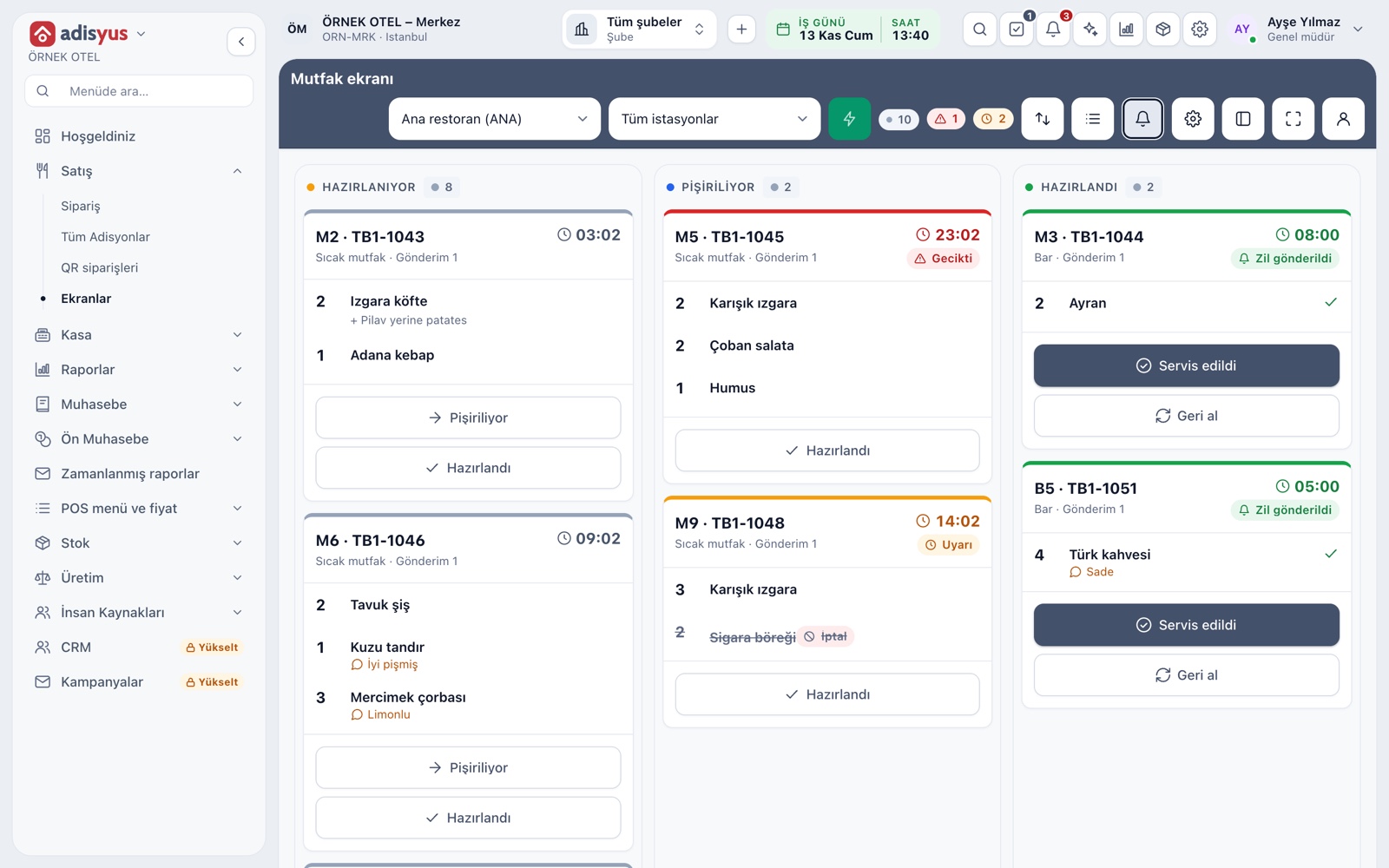
The hot kitchen, cold kitchen and bar are separate stations, and each order lands at the right station by item category. On the kitchen display orders flow with a timer, late orders change color, and a bell tells the server when an order is ready. A station works with a screen, a printer or both.

  • On a multi-course table the main course waits for your call
  • Time warning thresholds are set per outlet
  • No extra device is needed; the screen opens in the browser

Payment and till

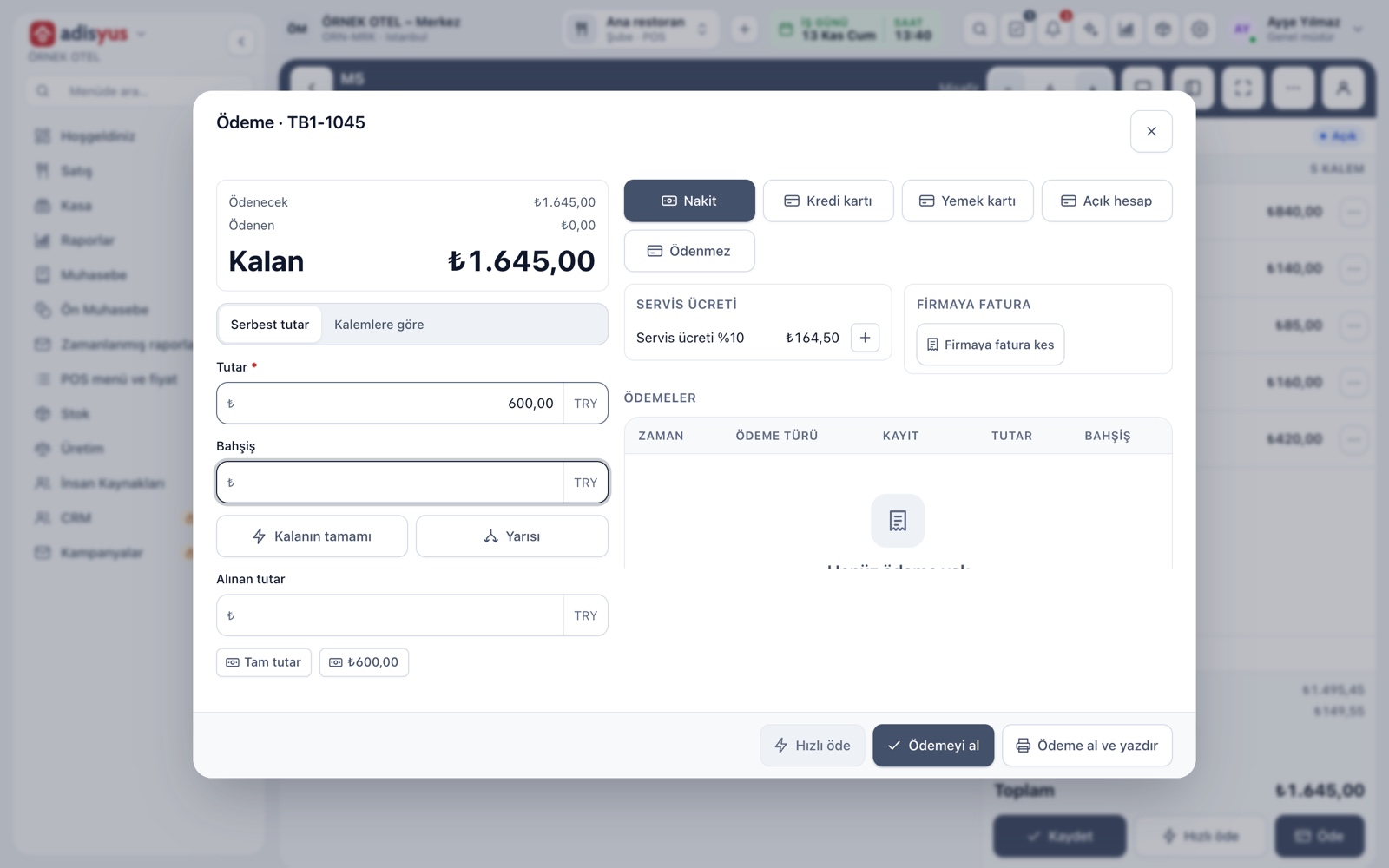
Cash, card, meal card and house account are taken in one window. When everyone at the table pays separately, choose a free amount, items or a guest group; mixed payment works too. The cashier opens a till session with an opening balance, and any count difference is recorded at close.

  • Tips and change are calculated
  • A refund is a reversing entry; nothing is deleted
  • A cashier sees only their own shift report

Ordering from the table with a QR menu

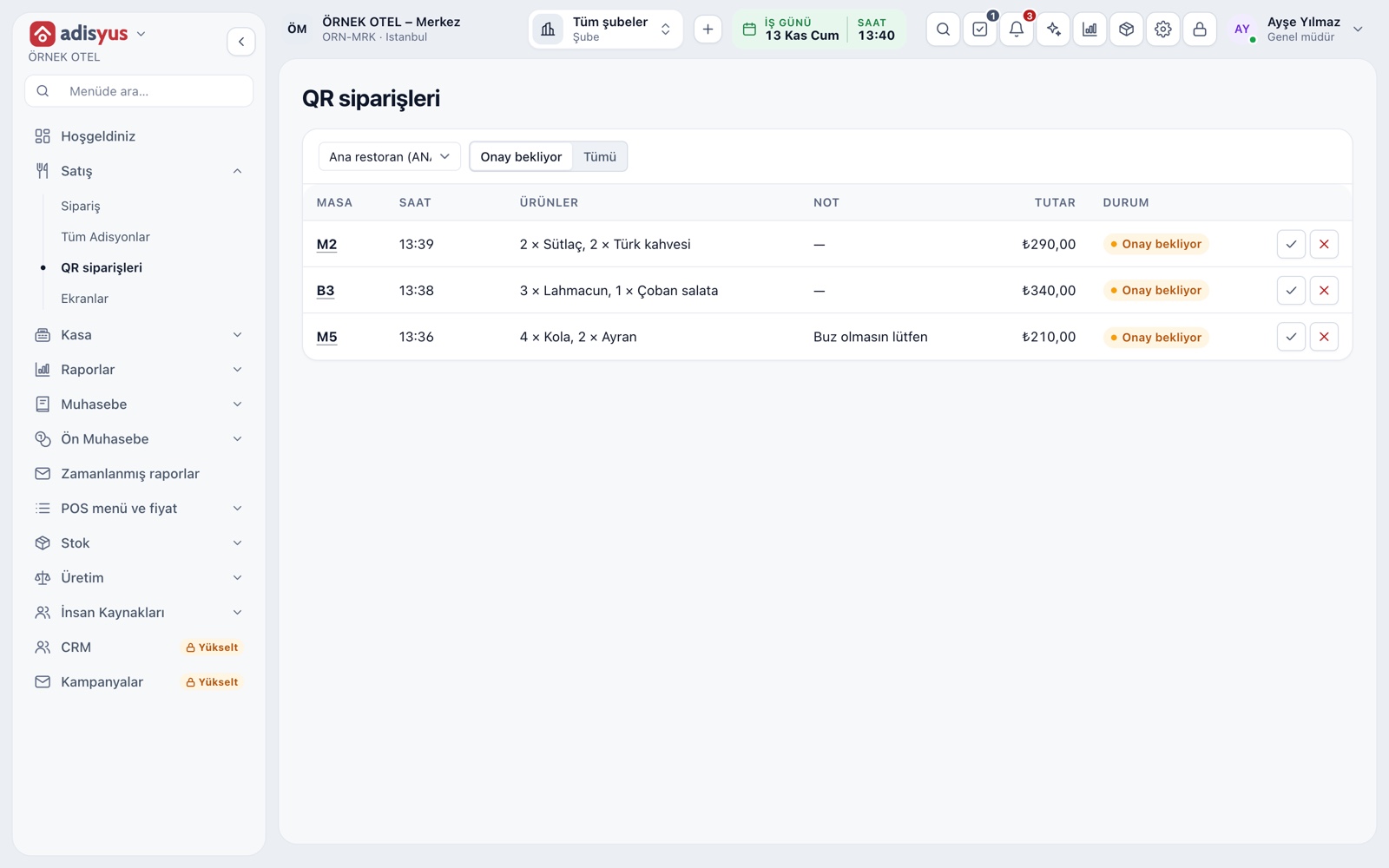
A QR code sits on every table. Guests scan it with their phone, browse the menu and send their order; they do not need to download an app or sign up. Staff approve the order, and an approved order is added to the check and goes to the kitchen.

  • Auto-approval can be switched on for busy hours
  • The menu comes from the same source as the POS menu, so there is no second menu
  • Logo, colors and welcome text are set per outlet

End of day, reports and stock

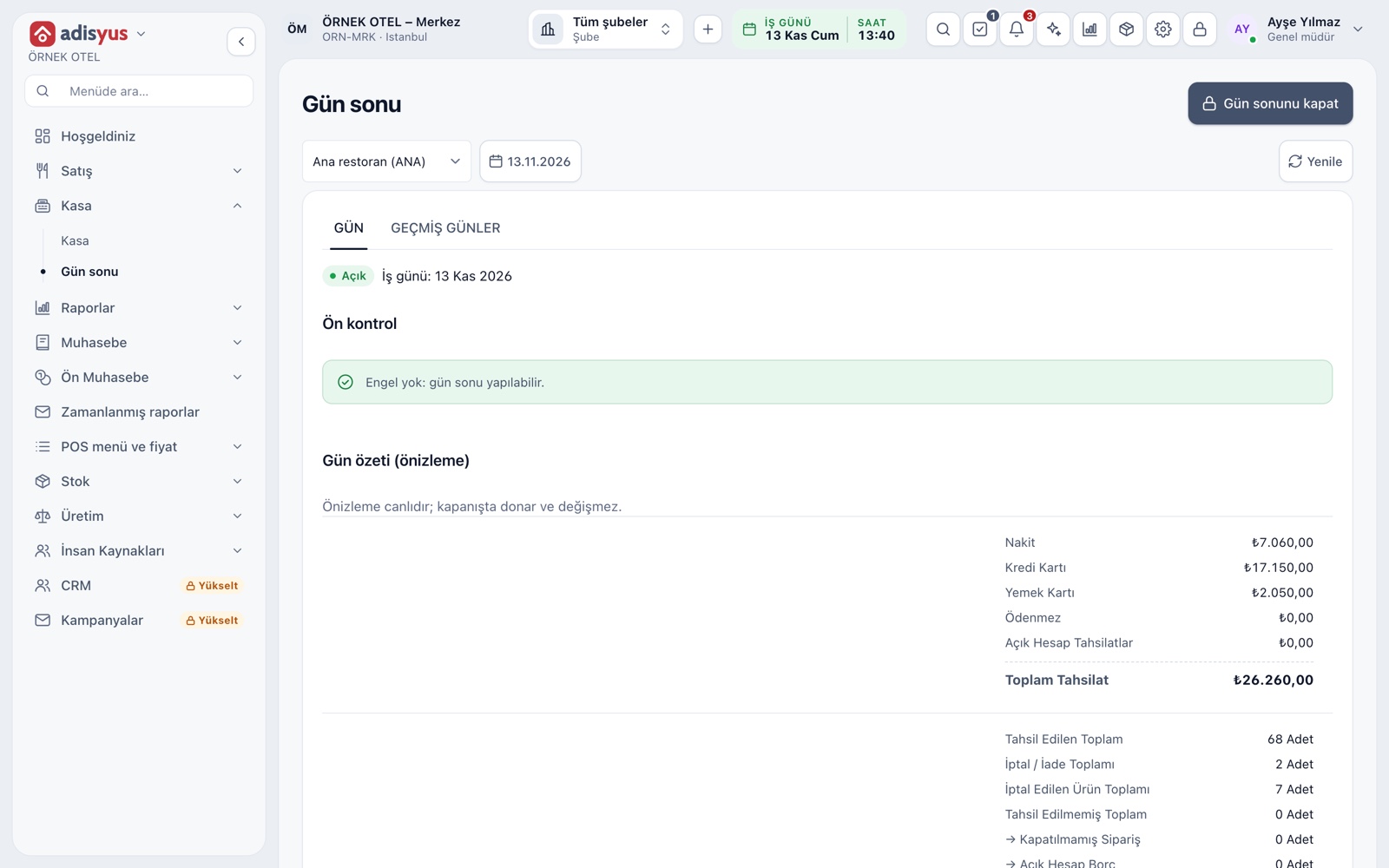
At end of day open checks, open till sessions and unclear card transactions are checked, and the summary of a closed day does not change. Item sales, server, payment type, comp and waste reports are filtered by outlet and time range. When a recipe item sells, its ingredients leave stock.

  • Menu, price lists and VAT settings are kept on the item card
  • Voids, comps and waste are listed with reason and authorizer
  • Several outlets are followed from one place

From the blog

All posts

Frequently Asked Questions

What kinds of businesses is adisyus for?

Restaurants, cafes, bars, patisseries, quick service and delivery kitchens. Each one has its own dining zones, tables and kitchen stations.

Can everyone at a table pay separately?

Yes. Payment is taken by item, by group or as a free amount, and the check screen can also split evenly per person. Each payment is a separate record.

Do guests need to download an app?

No. The QR code is scanned with the phone camera and the menu opens in the browser. No sign-up or personal details are asked for.

Do I need a separate device for the kitchen display?

No. The kitchen display is a page that opens in a browser and runs full screen on any device with one. A kitchen that does not want a screen can work with a printer only.

What is checked before I close the day?

Open checks, open till sessions and card transactions with an unclear result are listed. Once nothing blocks it the day closes and its summary no longer changes.

Meet adisyus

Let us call you for a live walkthrough, or try it free for 1 month.