
Discounts and Comps
A discount lowers the price, a comp gives an item on the house, and a non-paying check writes the bill to a person. Each has its own permission, reason, VAT effect and report, and who gave what and why stays on record.
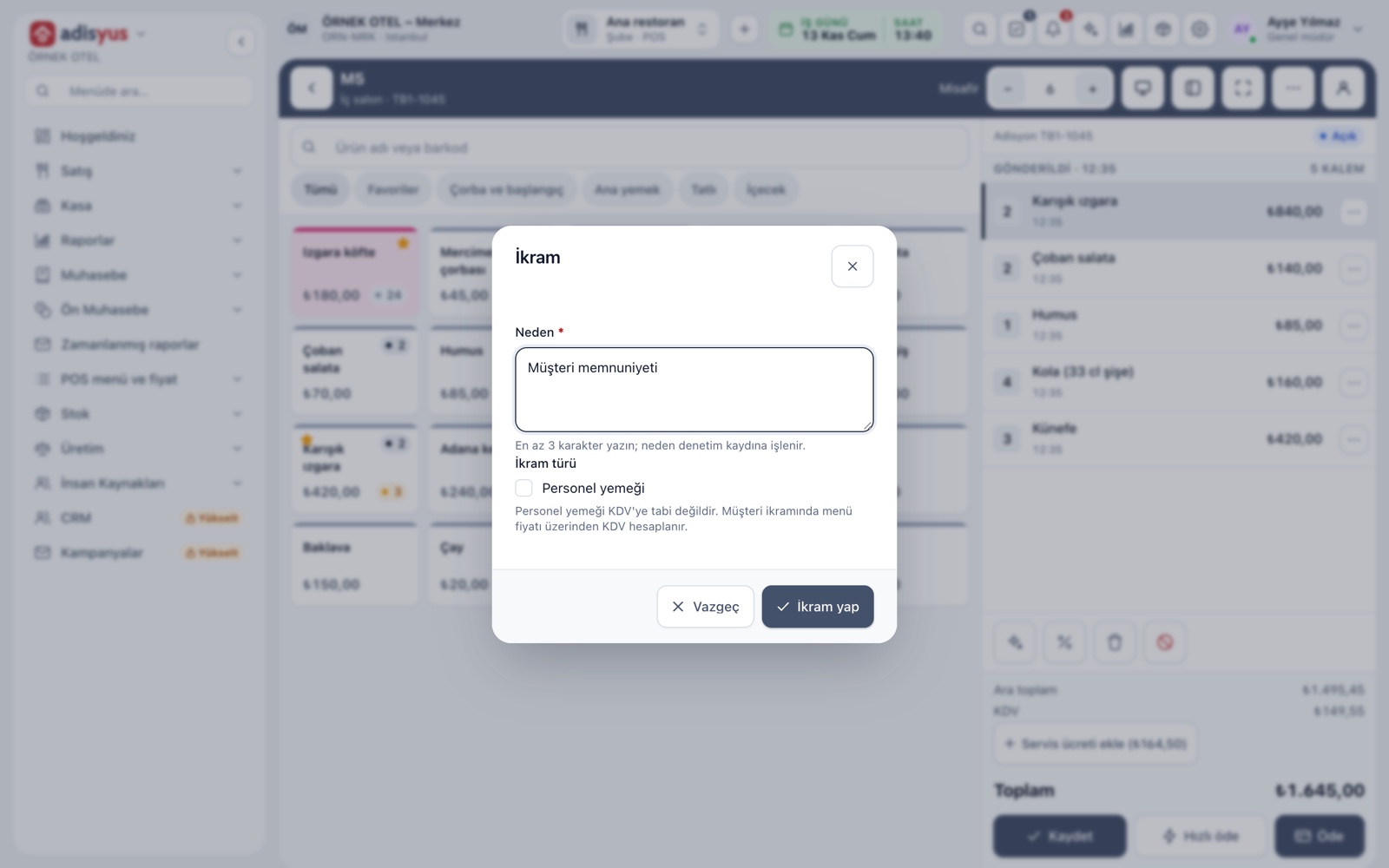
Comps: reason and type
A comp gives the item free but keeps the record. On the order screen you select a line and tap Comp; a reason is required. A comp is classed as a guest comp or a staff meal and shows on the check with its label. The comped line comes off the amount due, and its row stays on the check.
- The reason you write appears in the report with the authorizer.
- The VAT of a staff meal and a guest comp is treated separately.
- Stock reports show sales, comp and waste cost in separate columns.
- Comping needs a permission separate from discounting.
Line and check discounts
You define the discounts you give often once, and cashiers pick them from a list on the order screen. A discount applies to selected lines or the whole check as a percentage or an amount. A reason is written and logged. A given discount is removed, not deleted.
- A preset type has a name, a method (percentage or amount) and a value.
- A validity period, minimum amount and maximum discount can be added.
- A discount shows only on the items and outlets you choose.
- The reason for removal is recorded too.
SMS-coded discounts
Some discounts should not be open to everyone: a manager's relatives, a corporate agreement or a loyal-customer discount. This discount is tied to a person. At payment the cashier taps Send code, a 6-digit one-time code goes to that person's phone, and the discount applies once it is entered.
- You set how long the code stays valid.
- The phone number is masked in the list.
- The report totals SMS-coded discounts apart from manual ones.
Limits and permissions
The discount limit sets the highest rate an authorized user can give on a single line. Going over it needs a separate permission and a reason. Giving discounts, comping and closing as non-paying are separate permissions per role; you can give them to a cashier without giving them to a server.
- Every discount over the limit is written to the audit log.
- Defining types is a separate permission from applying discounts.
- For users without the permission the button does not work.
Non-paying checks
Non-paying writes the whole check to one person and closes it without collecting payment: a manager's table, a sponsor or business hospitality. On the payment screen you choose Non-paying, pick the person and write a reason. The people you can choose are accounts marked as non-paying persons on the account card.
- A non-paying close cannot be made without a person and a reason.
- Closing as non-paying needs its own permission.
- A non-paying check closes without a fiscal document.
Reports and audit trail
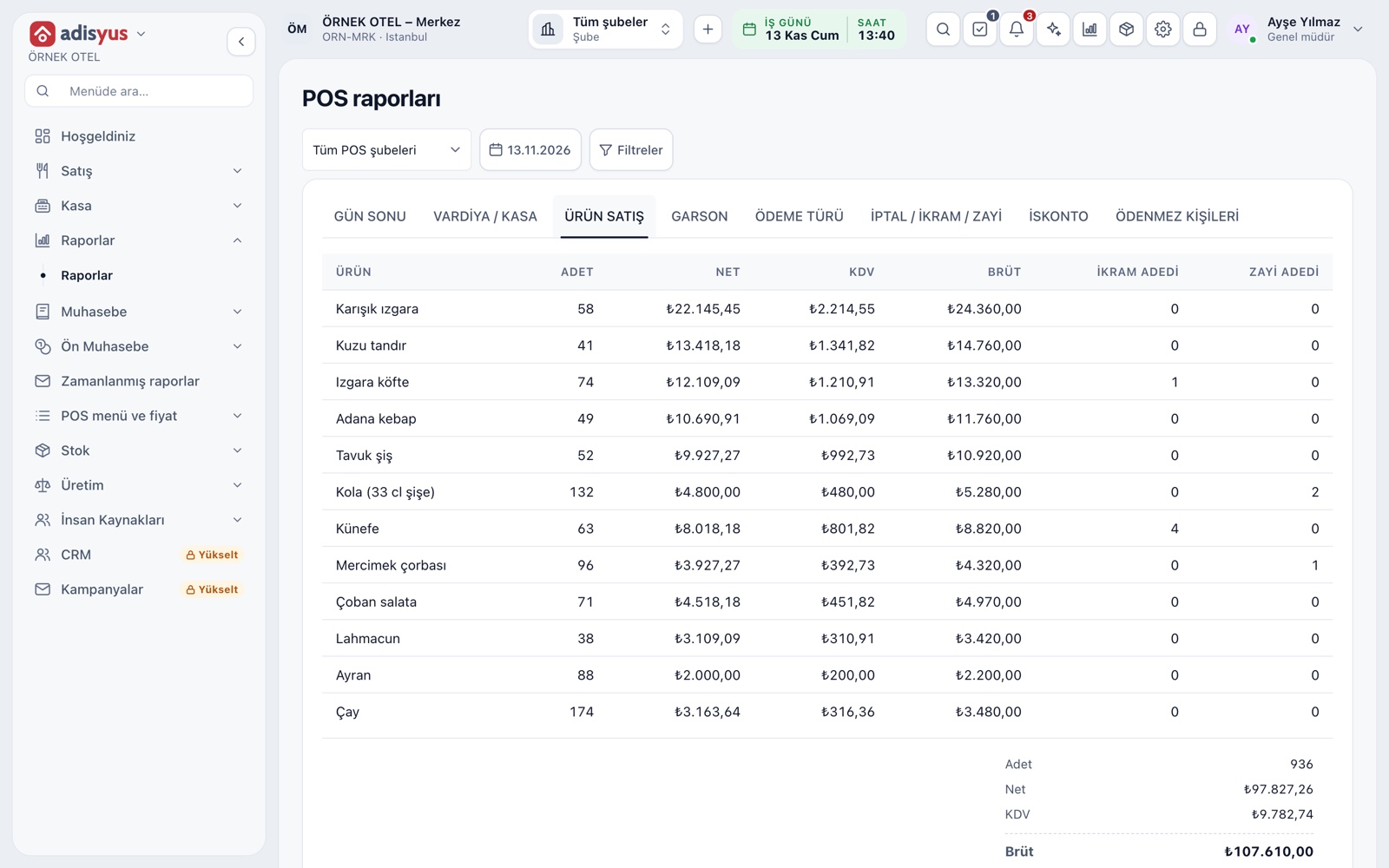
POS reports have Discounts, Cancel / comp / waste and Non-paying persons tabs. The discount report separates manual and SMS-coded discounts; the comp report lists type, check, line, amount, reason, authorizer and time.
- The day-end slip has a Total discounts given line.
- Reports filter by date and POS outlet.
- The authorizer and reason of every action stay on record.
Modules used together
Checks and Order Entry
Item entry, options, comps, split and merge bills
Learn morePayments and Collections
Cash, card and split payments; fiscal cash register (ÖKC) integration
Learn moreCustomers and House Accounts
Account customers, balances and open account tracking
Learn morePOS Reports
Product sales, end of day, shift, statistics, stock status and waste reports
Learn moreUsers and Permissions
Waiter, kitchen, cashier and manager roles with a permission matrix
Learn moreFrequently Asked Questions
Can I stop a server from giving discounts?
Yes. Discount, comp and non-paying close are separate permissions given per role. Remove them from the server role and the button stops working; leave them with the cashier or manager.
What is the difference between a discount and a comp?
A discount lowers the price and it is still a sale. A comp gives the item free, and its cost and VAT effect are tracked separately. Non-paying writes the whole check to a person and closes it without payment.
How is the VAT of a comp calculated?
The comp VAT base is chosen in POS settings. A staff meal and a guest comp are treated separately. Verify the right choice with your accountant under the current regulation.
Does an SMS-coded discount need anything extra?
The mobile number of the person the discount is tied to. The code is sent from your business's own SMS setup; if the SMS cannot be sent, no code is created and the discount is not applied.
Can I delete a discount after it was given?
It is removed, not deleted. The reason for removal is also written to the audit log, so both the given and the undone action show in reports.
Meet Discounts and Comps
Let us call you for a live walkthrough, or try it free for 1 month.