
Goods Receipt and Warehouse Transfers
Receive goods from the supplier against the delivery note; on approval, the stock entry and cost are posted. In a warehouse transfer, the issue and receipt are processed at the same moment.
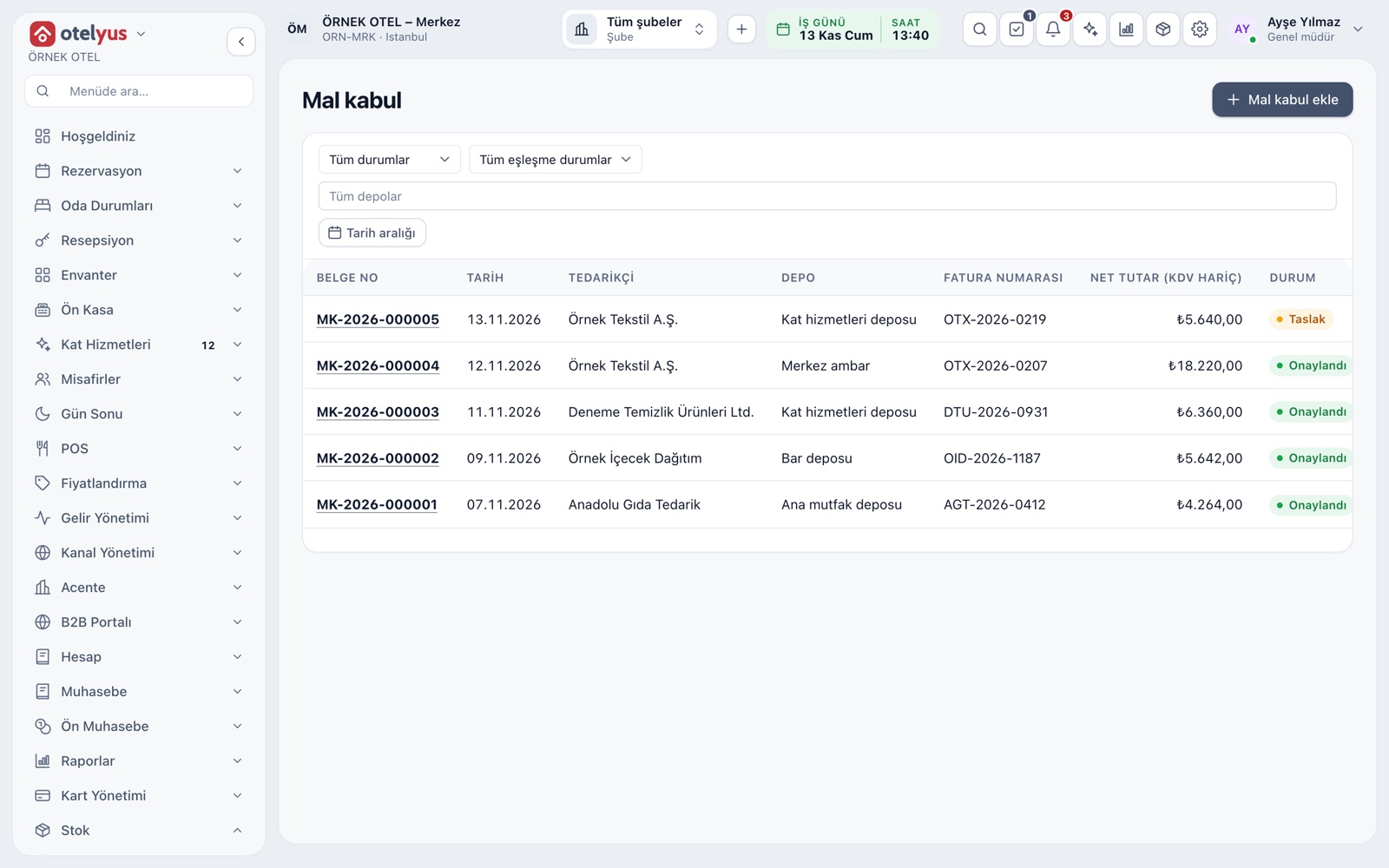
Goods Receipt Documents
The goods receipt list shows each document with its number, date, supplier, warehouse, invoice number, net amount excluding VAT and status. The Add goods receipt button opens a new document, and clicking a document number opens its details.
- Status, warehouse and date range filters work together.
- The document number is assigned automatically.
- The supplier is chosen from the account directory.
Draft, Approval and Immutability
A document is first saved as a draft, and a draft does not change stock. When you approve it, the receipt movements and weighted average cost are posted, and the document can no longer be changed. A wrong approved document is not deleted; a manual correction movement is used instead.
- Approval cannot be undone; the screen reminds you before you approve.
- An unapproved draft can be cancelled and never reaches stock.
- A correction appears as a separate line in the stock ledger.
Items, Tax and Freight
On each line you enter the stock card, quantity, unit, unit price excluding VAT, VAT rate and discount; the VAT rate is suggested from the card's purchase rate. Freight is entered as a single amount and spread across the lines into the cost. On approval, the card's last purchase price is updated.
- A discount cannot exceed the line amount.
- Line count and net total are calculated instantly.
- An entry in a different unit is converted to the card's stock unit.
Matching to the Purchase Invoice
A goods receipt is linked to a purchase invoice by the supplier's invoice number and name. The match is one of three states: no invoice, invoice matched, or invoice difference. The invoice net total is compared with the goods receipt net total, and a gap can point to a short delivery or a price difference.
- Invoice total, receipt total and the difference are shown side by side.
- A purchase invoice draft can be created from the incoming e-invoice inbox.
- Goods can also be received without an invoice.
Returns to Suppliers
Goods sent back to the supplier are recorded as a return movement that reduces stock; the return document number is the purchase return invoice or delivery note number. The accounting entry is made with the purchase return invoice. A wrong quantity is fixed with a manual correction, not by changing the goods receipt.
- A return is entered as a quantity in the card's stock unit.
- A return movement appears in the stock ledger with its own type.
Transfers Between Warehouses
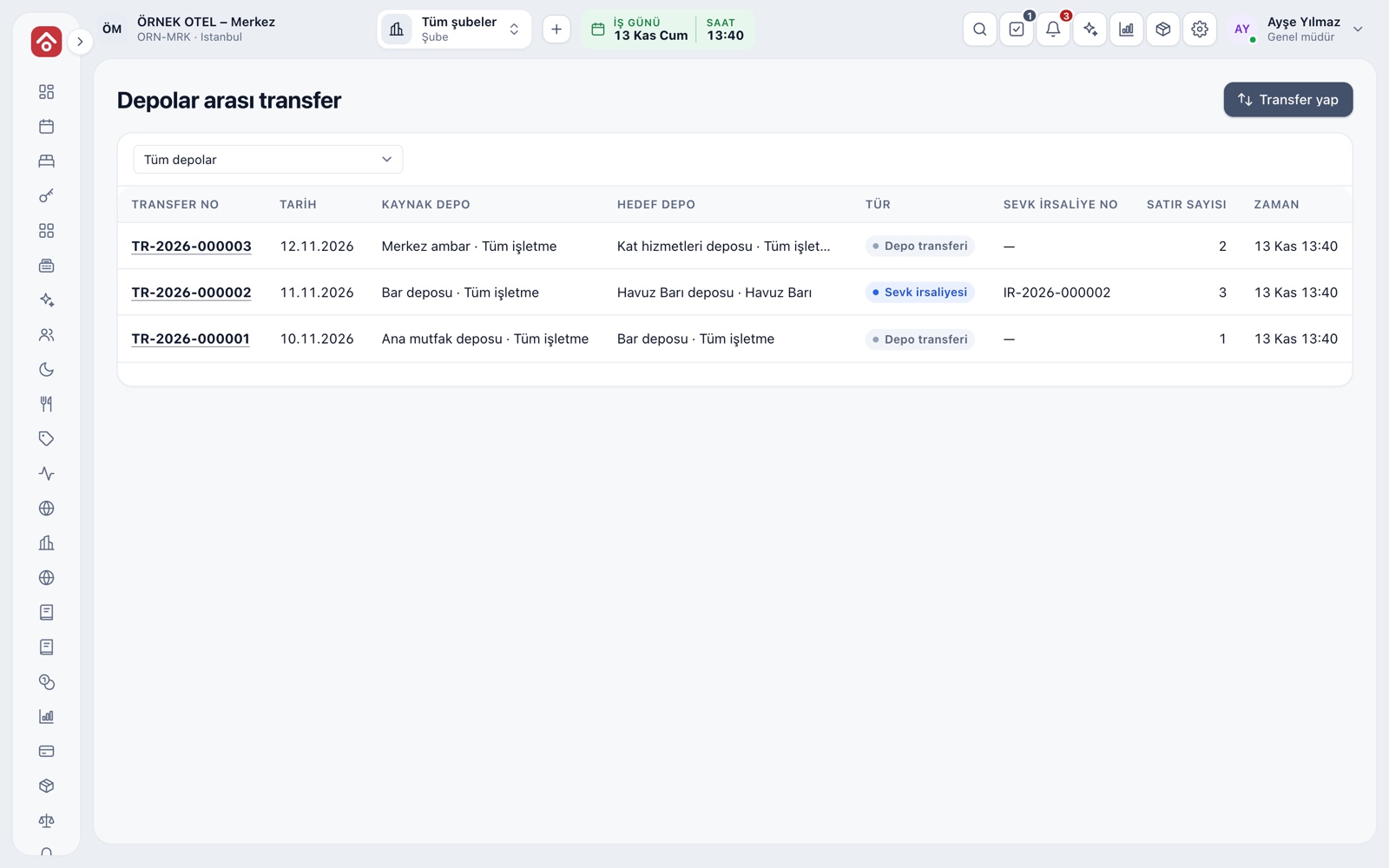
When you move stock from one warehouse to another, the issue and receipt are posted at once, and the cost moves with the stock. The source and destination warehouses must differ. Distribution from the main warehouse to a bar or kitchen store is done this way.
- A transfer makes two movements: issue at source, receipt at destination.
- The transfer list can be narrowed by warehouse.
- The stock balance updates instantly.
Shipments Between Companies
If the selected warehouses belong to different legal entities, the transfer is a sale. Before saving, the screen tells you so and asks for your approval; once approved, a delivery note is issued and a sales invoice draft lands in the To be invoiced list. Please confirm the document type and deadlines with your accountant.
- The sending and receiving legal entities are shown on screen.
- The invoice draft does not reduce stock a second time.
- A transfer within one legal entity is an internal transfer.
Modules used together
Inventory Management
Stock cards, warehouses, critical stock and movements
Learn morePurchasing
Requests, orders and receiving
Learn moreStock Count and Excel Import
Stock counts and bulk Excel import
Learn moreSales and Purchase Invoices
Issue invoices, purchase invoices, cancellations and returns
Learn moreSupplier Payables
Supplier balances and payment plans
Learn moreFrequently Asked Questions
Is a goods receipt the same as a purchase invoice?
No. A goods receipt records the goods received and the stock entry; a purchase invoice is the accounting document. They are matched by the supplier's invoice number.
Can I change a goods receipt after approving it?
No. An approved document is neither changed nor deleted; a manual correction movement is used for a wrong quantity.
What if goods arrive without an invoice?
You can receive them without an invoice; the match status stays at No invoice and is matched when the invoice arrives.
Can I move goods between my different companies?
Yes. If the warehouses belong to different legal entities, the transfer counts as a sale, and with your approval a delivery note and an invoice draft are prepared.
Meet Goods Receipt and Warehouse Transfers
Let us call you for a live walkthrough, or try it free for 1 month.