
Sales and Purchase Invoices
A sales invoice is prepared from a folio, POS bill, venue payment or by hand, issued with a series number and posted to accounting. Purchase invoices go through approval. An issued document never changes; corrections are by cancellation or credit note.
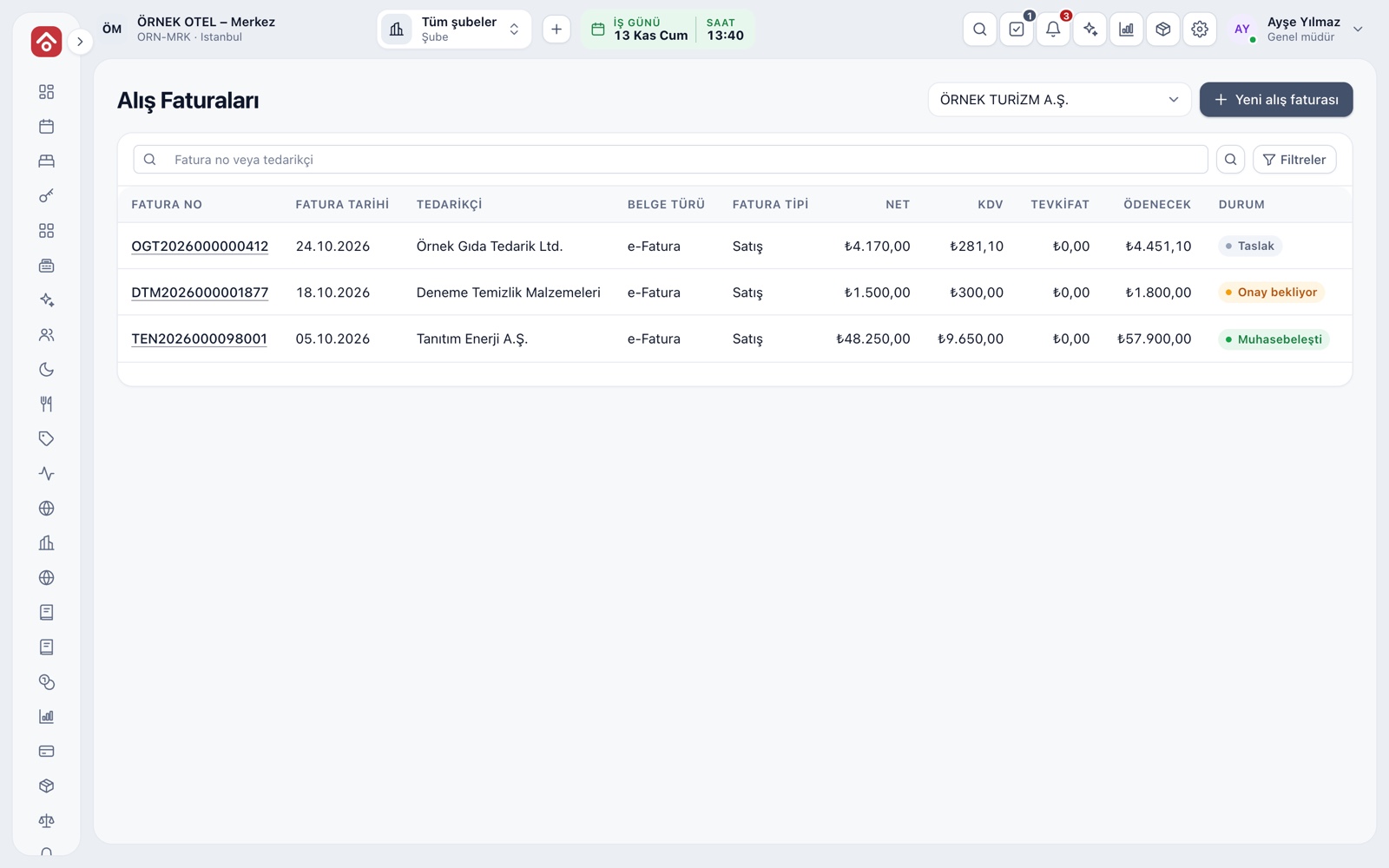
Sales and Purchase Invoices on One Line
Hotel folios, POS bills and venue payments feed the same invoice line, and a sales invoice is prepared from them or by hand. A purchase invoice is entered by hand or turned into a draft from the incoming e-invoice inbox; on approval the journal entry and the supplier's account credit are posted, and a preview shows the entry beforehand.
- The invoice total is compared with the document total you entered.
- Submission, approval and return steps appear in the history.
- The preparer cannot approve their own purchase invoice.
- An invoice cannot be approved if the supplier has no account.
Sources Waiting to Be Invoiced
The To be invoiced page collects the sources that wait for an invoice: folios checked out in the last 45 days, POS bills, venue payments and final venue invoices. Each source shows its amount, customer and status.
- Status: Pending, In draft, Invoiced or Ignored.
- A line cannot go into two invoices.
- An unwanted source is ignored, and a record is kept.
Invoice Draft, Series and Number
In the draft you set the buyer, service period, series and items. The buyer comes from the account card or is entered with identity details, and item prices can be entered including or excluding VAT. The number is given at the moment of issue and restarts at 1 each year; the invoice date cannot be in the future.
- If you abandon a draft, no number is used up.
- e-Invoice and e-archive use separate series prefixes.
- Each document type has a default series.
- On a foreign-currency invoice, the rate and TL equivalent are written on the invoice.
Seven-Day Limit and Interim Invoices
Under the rules, an invoice must be issued within seven days of the end of the service at the latest. The system follows the period from the service end: days left or overdue show in the list, and a warning appears as the last day approaches. If the period has passed, a late-issue reason is required.
- If a stay crosses month end, the invoice can be split into monthly periods.
- The late-issue reason is written to the audit trail.
- Please confirm the deadlines with your accountant.
VAT, Accommodation Tax and Withholding
On an invoice, the VAT rate comes from the item's class; accommodation tax is a separate tax line and is not part of the VAT base. On a prepaid sale, accommodation tax is deferred and issued on a supplementary invoice after checkout. Withholding and exemption codes are chosen per item.
- Totals show base, VAT, accommodation tax and amount to collect.
- The accommodation tax supplementary invoice is linked to the main invoice.
- A difference warning appears while the folio is open.
A Sales Invoice Does Not Touch Stock
A sales invoice does not take part in stock on its own; stock is reduced at sale only from the POS bill. On an invoice, stock is reduced only if you explicitly choose Deduct from stock for an item. On lines from a POS bill or venue, stock was already deducted, so the option is hidden and nothing is deducted twice.
- A stock card and warehouse are chosen for the selected item.
- When an invoice is cancelled, the stock deduction is reversed.
- On a credit note, items that reduced stock go back into the warehouse.
Cancellation, Credit Notes and Accounting Entry
An issued invoice is not changed; corrections are made with a cancellation or a credit note. Cancellation is possible within eight days of issue; the number is used up, the accounting entry is reversed and the folio lines are freed. An issued invoice turns into an account movement and a journal entry by debiting the buyer's account.
- On a credit note, the selected lines are reversed exactly.
- The reason for cancellation or credit is written to the audit trail.
- If a City Ledger transfer is tied to the invoice, cancel the invoice first.
Modules used together
e-Invoice and e-Archive
Electronic documents sent through an integrator
Learn moreAccount (Ledger) Management
Customer, supplier and agency accounts, opening entries
Learn moreTax, Withholding and Exemption Codes
VAT and accommodation tax rates are kept with their effective dates, and every line stores the rate of its transaction date. Withholding and exemption codes are checked on the invoice before it is issued. Confirm rates and dates with your accountant.
Learn moreSupplier Payables
Supplier balances and payment plans
Learn moreCity Ledger and Open Accounts
City ledger means transferring an in-house guest's bill to a company or travel agency. The transfer is approved, posted to the account when the folio closes, and the open balance is followed with ageing.
Learn moreFrequently Asked Questions
By when must I issue the invoice?
Within seven days of the end of the service at the latest. If that has passed, a late-issue reason is required. Please confirm the deadlines with your accountant.
Can I correct an invoice that has been issued?
An issued invoice is not changed. It can be cancelled within eight days of issue; after that, it is corrected with a credit note.
Does issuing an invoice reduce stock?
No. Stock is reduced at sale only from the POS bill. On an invoice, stock is reduced only if you explicitly choose Deduct from stock on the line.
Can I issue an invoice while the folio is open?
If the stay is still in progress, the invoice is marked as a partial invoice. A tax difference warning appears while the folio is open, and the draft is prepared again when it closes.
Who approves purchase invoices?
An authorised user does; by default the person who prepared an invoice cannot approve it. Preparing, issuing, cancelling and crediting an invoice are separate permissions.
Meet Sales and Purchase Invoices
Let us call you for a live walkthrough, or try it free for 1 month.