
Units and Portions
Measurement units are defined once and products derive portions from them. A half or full portion, a 33 cl bottle or a litre: each sells at its own price and shares the same definition with stock and recipes.
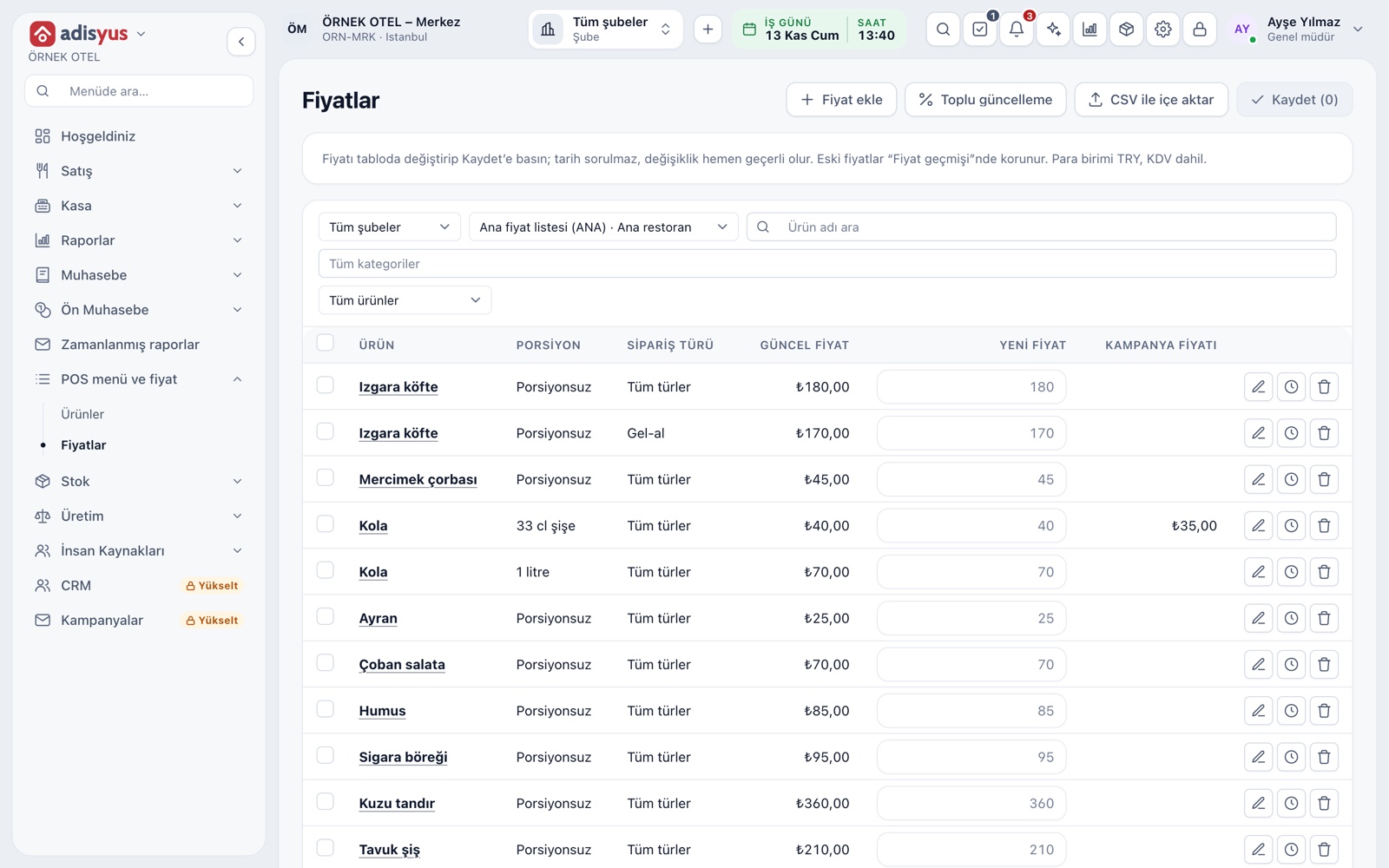
Portions and portion prices
A portion is the size an item is sold in: half and full for soup, a 33 cl bottle and 1 litre for cola, a hundred grams and a kilogram for fish. You define the item once and add its portions; you do not open separate items for half and full. A price is set for the item and portion pair and can also vary by order type.
- Each portion has a code, a name and a quantity.
- One portion is the item's default.
- The promo price is a separate column per portion.
- A portion without a price cannot be sold.
Measurement units
Units such as piece, kilogram, gram and litre are defined on one screen. The Complete default units button adds the common ones in one click. The same definition is used on stock cards, recipes, goods receipt and POS items, so a name you change in one place changes everywhere.
- Add your own units with Define unit.
- The national code is written on e-invoice and e-archive documents as the unit.
- An unused unit is archived, not deleted.
- Units are shared between the hotel and POS sides.
Items without portions
Not every item needs portions. Without portions an item sells at a single price and the order screen asks no extra question. Portions can be added later; past checks stay as they are.
- An item without portions shows as No portion in the price table.
- The portion question appears only for items with several portions.
- An item without portions can be used with option and combo groups.
Portions on the order screen
When you tap an item with several portions, the choice dialog asks for the portion first and keeps the default selected. The server changes it with one tap, sets the quantity and adds it. The check line shows the portion name with the item, for example Cola (33 cl bottle).
- Portion choice is single and required.
- The best-selling portion is marked as the default.
- Different portions of one item become separate lines on the check.
Link to recipes and stock
A portion also carries through to stock and cost. A recipe is tied to the item and portion pair, and a half portion can have its own recipe. The stock card's unit is the single source: recipes, goods receipt and sales deduction all use the card's unit.
- Recipe quantity is entered for 1 unit sold.
- The stock unit cannot be changed after the first movement.
Modules used together
Menu and Product Management
Categories, products, photos, favorites and sales status
Learn moreModifiers and Option Groups
Single/multiple choice, extras and removed-ingredient groups
Learn moreStock and Recipe Costing
Recipe-based costing, stock counts and waste tracking
Learn moreVAT Rates
Tax groups and product-level VAT
Learn moreChecks and Order Entry
Item entry, options, comps, split and merge bills
Learn moreFrequently Asked Questions
Should I open half and full portions as separate items?
No. Define the item once, add half and full portions to it and give each its own price. Reports and stock track them as portions of the same item.
Can I sell an item by the kilogram?
Yes. Kilogram comes predefined; add a kilogram or gram-based portion to the item and set its price on the portion. Stock uses the same unit.
Do old checks change if I add a portion?
No. Past checks, prices and reports stay as they are. Adding a portion affects new orders only.
Are units shared between the hotel and POS?
Yes. Measurement units live in a shared catalog and are managed on the same screen, whichever product you use.
Meet Units and Portions
Let us call you for a live walkthrough, or try it free for 1 month.