
Plans and Quota Management
You follow your plan limits, usage and purchased add-ons on one screen. A warning appears as you near a limit; when a limit is full your data stays readable and only new records are blocked.
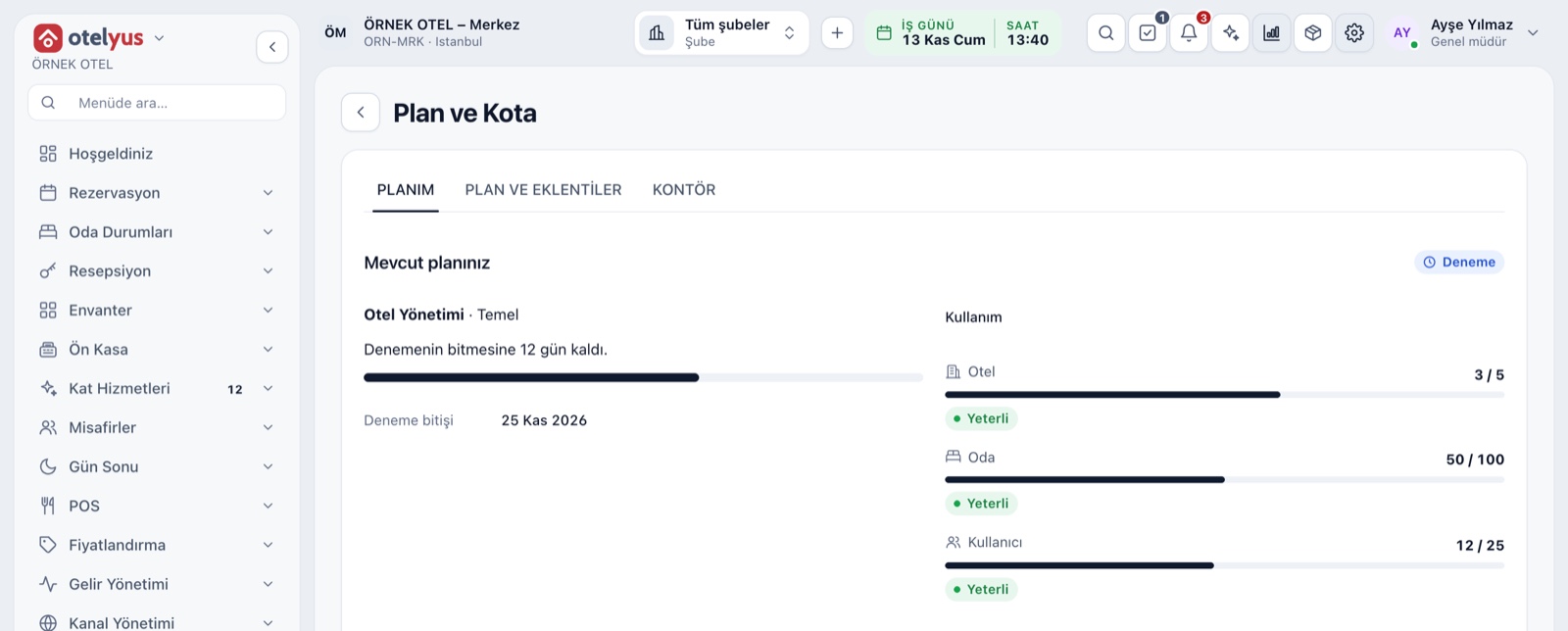
My Plan: status and usage
The Plan and Quota screen has three tabs: My Plan, Plan and Add-ons, and Credits. My Plan shows your current plan, term and renewal date, and the days left if you are on a trial. Usage meters for hotels, rooms and users sit on the right.
- No card details are asked for during the trial.
- The plan button in the top bar takes you here in one click.
- The renewal amount is shown including VAT.
What is measured
Quotas fall into two groups: things that are counted and usage measured over time. Each quota is shown in its own unit against your plan allowance, so you can see in advance which limit will get tight and when.
- Counted: hotels, rooms, users, POS branches, terminals and venues.
- File storage (GB) and the number of simultaneous sessions.
- Daily API calls and daily email, SMS and WhatsApp messages.
Thresholds and warnings
Every meter is at one of four levels: enough, approaching, nearly full and full. If a resource is nearing its limit, a You are nearing your plan limit warning and an Upgrade plan button appear at the top of the screen. Unlimited resources are marked Unlimited.
- The warning names the resource, the plan limit and current usage.
- Meters state the level in text, not by colour alone.
- The System Health screen tracks the storage quota separately.
What happens when a limit is full
When a limit is reached your data is not deleted and stays readable; only new records are blocked. The screen says which resource is full, and you either upgrade the plan or archive what you no longer use. If you downgrade, the excess is not deleted but shown in a To fix list.
- A new record attempt stops with a clear limit message.
- For a right your plan lacks, the upgrade route is shown.
- The last allowance is never granted twice at the same moment.
Plan, tier and upgrade
Plans are per product: hotel, POS and wedding venue each come with their own measures, tiers and plan templates. Hotel has Starter, Standard and Advanced tiers. On an upgrade you pay only the difference for the rest of the period and the new plan opens immediately on payment approval.
- The period is monthly or yearly; yearly gets a discount.
- A plan does not change while a payment is pending or failed.
- Only the business owner and chain manager can purchase.
- Each product can be taken on its own or together.
Extra capacity and credits
When a quota fills, upgrading the plan is not the only way: there are extra capacity items for more hotels, file storage and users. Services measured by use, such as e-documents, bulk email and bulk SMS, run on credits, and the Credits tab shows your balance and recent movements.
- An extra hotel's monthly fee is charged pro rata for the rest of the term.
- Each e-Invoice and e-Archive document uses one credit.
- Sending through your own email and SMS account uses no credits.
- When the balance runs out, the document is created and sending waits for a new pack.
Modules used together
Frequently Asked Questions
If I exceed my limit, is my data deleted?
No. When a limit is full your existing data stays readable and only new records are blocked. You upgrade the plan or archive what you no longer use.
Can I downgrade my plan?
Yes. If the new plan's limit is below your usage, nothing is deleted; the excess shows in the To fix list and new records are blocked.
What happens when the trial ends?
To continue you choose a plan and pay, and your selected products and items become a permanent subscription. No card details are asked for during the trial.
Who can change the plan?
The business owner and the chain manager. Other roles can view the plan and usage but cannot place an order.
Meet Plans and Quota Management
Let us call you for a live walkthrough, or try it free for 1 month.